# Vue: state and slots
Use this pattern when your Vue editor needs app-owned specs, a sibling inspector, and custom node content that updates independently of the canvas. Defaults seed the live model once; controlled refs provide a return path from that model into your app.
Start from the project in the [Vue quick start](https://bench-grafloria-61d.atloria.app/p/bench-grafloria-61d-mQCmWpDrxv/developer/vue-quick-start). Its packages and entry file stay in place. Add the components below, then import and render the component you want to try inside the existing `src/App.vue` template; keep the starter's other imports, styles, and entry wiring.
## 1. Choose controlled refs or mount-time defaults
Build on the [Vue quick start's controlled bindings](https://bench-grafloria-61d.atloria.app/p/bench-grafloria-61d-mQCmWpDrxv/developer/vue-quick-start#2-use-app-owned-state-and-a-custom-node-slot) for [`GrafloriaFlow`](https://bench-grafloria-61d.atloria.app/p/bench-grafloria-61d-mQCmWpDrxv/developer/grafloria-vue#grafloriaflow), [`NodeSpec`](https://bench-grafloria-61d.atloria.app/p/bench-grafloria-61d-mQCmWpDrxv/developer/grafloria-renderer-instance-nodespec), and [`EdgeSpec`](https://bench-grafloria-61d.atloria.app/p/bench-grafloria-61d-mQCmWpDrxv/developer/grafloria-renderer-instance-edgespec): here, slot actions return engine-driven removals to your refs.
This component renders Build connected to Deploy. Its custom cards share a provider with an inspector. Removing a card through its engine updates the controlled node ref as well as the diagram.
```vue title="src/components/StateFlow.vue"
{{ data['title'] }}
Owner: {{ data['owner'] }}
```
Complete the inspector and metric files in the next two steps before running this component. [`DiagramInstance`](https://bench-grafloria-61d.atloria.app/p/bench-grafloria-61d-mQCmWpDrxv/developer/grafloria-renderer-instance-diagraminstance) arrives through `@init`. Enabling `comments` creates a [`CommentStore`](https://bench-grafloria-61d.atloria.app/p/bench-grafloria-61d-mQCmWpDrxv/developer/grafloria-engine-comments#commentstore); `getCommentStore()` returns it, or `null` when comments are disabled. [`GrafloriaCommentPanel`](https://bench-grafloria-61d.atloria.app/p/bench-grafloria-61d-mQCmWpDrxv/developer/grafloria-vue#grafloriacommentpanel) displays the same store, including the review thread anchored to Build. The flow owns teardown of its instance. Dispose the comment store in the containing component's `onBeforeUnmount` hook to remove its subscriptions.
Build and Deploy appear as connected cards with owners, run counts, increment and remove buttons, a sibling selection readout, and the review comment.
For an editor where the diagram owns all subsequent changes, use the uncontrolled form from the [Vue quick start's first flow](https://bench-grafloria-61d.atloria.app/p/bench-grafloria-61d-mQCmWpDrxv/developer/vue-quick-start#1-create-a-vue-project-and-mount-the-first-flow).
Vue's `update:nodes` requires a bound `nodes` prop and reports additions, removals, and committed node gestures rather than every drag frame, with selection on a separate event surface; see the [Qwik quick start's ownership pattern](https://bench-grafloria-61d.atloria.app/p/bench-grafloria-61d-mQCmWpDrxv/developer/qwik-quick-start#2-mount-the-flow-and-return-changes-to-signals) for the shared distinction between controlled inputs and mount-time `defaultNodes` and `defaultEdges`.
## 2. Expose the instance to a sibling inspector
[`GrafloriaProvider`](https://bench-grafloria-61d.atloria.app/p/bench-grafloria-61d-mQCmWpDrxv/developer/grafloria-vue#grafloriaprovider) publishes the flow's instance to siblings beneath it. Call the composables in the inspector's setup, not in the component that renders the provider: injection looks upward through ancestors.
Unlike the values used in the [React sibling-panel pattern](https://bench-grafloria-61d.atloria.app/p/bench-grafloria-61d-mQCmWpDrxv/developer/react-state-and-content#2-share-the-instance-with-sibling-panels), Vue's [`useGrafloria`](https://bench-grafloria-61d.atloria.app/p/bench-grafloria-61d-mQCmWpDrxv/developer/grafloria-vue#usegrafloria), [`useSelection`](https://bench-grafloria-61d.atloria.app/p/bench-grafloria-61d-mQCmWpDrxv/developer/grafloria-vue#useselection), and [`useViewport`](https://bench-grafloria-61d.atloria.app/p/bench-grafloria-61d-mQCmWpDrxv/developer/grafloria-vue#useviewport) return refs read through `.value`, while [`useOnSelectionChange`](https://bench-grafloria-61d.atloria.app/p/bench-grafloria-61d-mQCmWpDrxv/developer/grafloria-vue#useonselectionchange) registers its callback in setup with scope-owned teardown.
The inspector module includes a sized flow for standalone use. Pass `:standalone="false"`, as in `StateFlow.vue`, to show only the panel beside an existing flow.
```ts title="src/components/FlowInspector.ts"
import { defineComponent, h, ref } from 'vue';
import { GrafloriaFlow, GrafloriaProvider, useGrafloria, useSelection, useViewport, useOnSelectionChange } from '@grafloria/vue';
import type { NodeSpec, EdgeSpec } from '@grafloria/renderer';
const InspectorPanel = defineComponent({
setup() {
const instance = useGrafloria();
const selection = useSelection();
const viewport = useViewport();
const lastSelection = ref('No selection event yet');
useOnSelectionChange((change) => {
lastSelection.value = change.nodes.map((node) => node.id).join(', ') || 'No nodes selected';
});
function zoomIn(): void {
const api = instance.value;
if (api) api.viewport.setZoom(viewport.value.zoom * 1.2);
}
return () => h('aside', [
h('button', { type: 'button', disabled: !instance.value, onClick: zoomIn }, 'Zoom in'),
h('p', `${selection.value.nodes.length} nodes and ${selection.value.edges.length} edges selected · ` +
`zoom ${viewport.value.zoom.toFixed(2)} · ` +
`camera ${viewport.value.x.toFixed(0)}, ${viewport.value.y.toFixed(0)}`),
h('p', `Last selection event: ${lastSelection.value}`),
]);
},
});
export default defineComponent({
props: { standalone: { type: Boolean, default: true } },
setup(props) {
const nodes: NodeSpec[] = [
{ id: 'build', label: 'Build', position: { x: 60, y: 90 }, size: { width: 180, height: 70 } },
{ id: 'deploy', label: 'Deploy', position: { x: 380, y: 90 }, size: { width: 180, height: 70 } },
];
const edges: EdgeSpec[] = [{ id: 'pipeline', source: 'build', target: 'deploy' }];
return () => props.standalone
? h(GrafloriaProvider, null, {
default: () => [
h(InspectorPanel),
h('div', { style: 'height:400px;width:100%' }, [
h(GrafloriaFlow, { defaultNodes: nodes, defaultEdges: edges }),
]),
],
})
: h(InspectorPanel);
},
});
```
To run this step independently, add this host and import it into the existing `src/App.vue` script. Render the imported component inside the existing template; `FlowInspector` already includes the mounted flow, so this host adds no specs or canvas wiring from the [Vue quick start](https://bench-grafloria-61d.atloria.app/p/bench-grafloria-61d-mQCmWpDrxv/developer/vue-quick-start#1-create-a-vue-project-and-mount-the-first-flow):
```vue title="src/components/InspectorFlow.vue"
```
A Zoom in button and selection and camera readouts appear above Build connected to Deploy.
Click a node to select it: the counts and last-event text change from the library's selection events. Click Zoom in: the camera readout follows the applied zoom, including its limits. For consumers in the flow's default slot or inside a custom node, the flow provides its own instance context even without an outer provider.
## 3. Keep custom slot content reactive
An exact `#node-card` slot opts nodes of type `card` into HTML rendering. The engine positions the box and keeps its connections; your slot paints the interior. The slot receives `node`, the live model; `data`, its payload or an empty object; and `engine`, the same engine returned by `getEngine()`.
For content driven by your app, render a component that reads a reactive source by node id. The following store and component give each card a live run count. Clicking Increment runs updates that card without changing diagram membership or requesting a canvas repaint.
```ts title="src/components/metrics.ts"
import { reactive } from 'vue';
export const runs = reactive(new Map([
['build', 3],
['deploy', 1],
]));
```
```vue title="src/components/MetricCard.vue"
Runs: {{ count }}
```
The card root in `StateFlow.vue` fills its host with `height: 100%` and includes padding inside its declared footprint with `box-sizing: border-box`. The footprint itself comes from the node's `size`. Ports also belong to the spec: the sample replaces the default ports with a numeric output and input and pins the edge to their ids. Try the [slot-defined custom nodes demo](https://grafloria.com/demos-vue/#/nodes/html-nodes) and the [typed ports demo](https://grafloria.com/demos-vue/#/ports/typed-ports). If you only need a styled shape rather than Vue content, compare the [shape-based nodes demo](https://grafloria.com/demos-vue/#/nodes/custom-nodes).
| Slot choice | What renders |
| --- | --- |
| `#node-` | An exact type match opts a plain spec into custom rendering when `custom` is omitted. |
| `#node` | A wildcard paints already-custom nodes without an exact slot; set `custom: true` to opt such a spec in. |
| Explicit `custom: true` | The node uses the custom path, with an exact slot preferred over the wildcard. |
| Explicit `custom: false` | The node stays on the SVG path, even with a matching slot. |
The Remove button uses `engine.removeNode(node.id)`, so deletion goes through command history rather than mutating your Vue array. Undo and redo belong to the engine, not the instance. See [Commands and history](https://bench-grafloria-61d.atloria.app/p/bench-grafloria-61d-mQCmWpDrxv/developer/commands-and-history) for event-driven history controls, or try the [Vue undo/redo demo](https://grafloria.com/demos-vue/#/interaction/undo-redo).
## 4. Take snapshots, request layout, and reopen a saved document
The flow's template-ref surface exposes `getInstance()`, `applyLayout()`, and `snapshot()`. `snapshot()` returns the model's schema-versioned serialization, or `null` before initialization. `applyLayout()` accepts a registry name or `{ name, options }` and emits `layoutDone` after the layout resolves. For typed application code, capture the instance through `@init` and use its model for a snapshot; use the component's `layout` prop for declarative layout.
This separate example starts with two plain boxes. Arrange top to bottom changes the layout request. Save document captures the live model in an integrity-checked envelope. Open saved copy loads that string once and renders a separate mounted view, leaving newer edits in the original untouched.
[`DiagramSerializer`](https://bench-grafloria-61d.atloria.app/p/bench-grafloria-61d-mQCmWpDrxv/developer/grafloria-engine-serialization#diagramserializer) writes the envelope. [`fromDocument`](https://bench-grafloria-61d.atloria.app/p/bench-grafloria-61d-mQCmWpDrxv/developer/grafloria-element-core#fromdocument) checks and loads it into a render spec; [`GrafloriaDiagram`](https://bench-grafloria-61d.atloria.app/p/bench-grafloria-61d-mQCmWpDrxv/developer/grafloria-vue#grafloriadiagram) mounts that spec rather than hand-projecting models into node arrays.
```vue title="src/components/SnapshotFlow.vue"
{{ status }}
{{ snapshotText }}
Saved copy
```
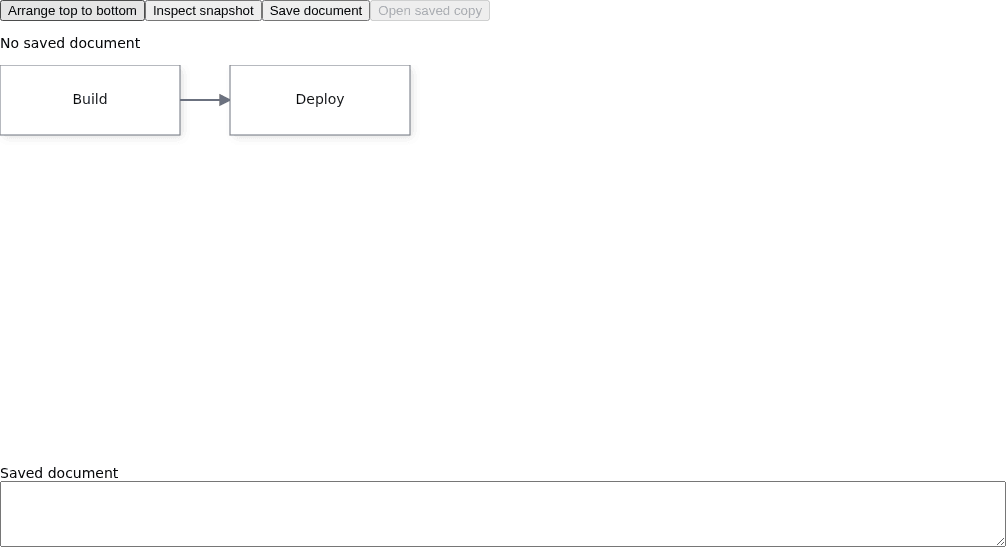
The snapshot includes nodes, links, ports, groups, metadata, the model viewport, and any comments or ink. The mounted copy retains nodes and links with their ports and node metadata, groups, and ink, but starts with a fresh camera position and zoom and does not retain diagram-level metadata or comments. The saved model viewport is not the live camera state. The snapshot does not contain your Vue component code, the `runs` map, or the engine's command history. Persist app-owned metric state separately. This example uses built-in boxes in both views; restoring custom content also requires the app's painter. For persistence and custom rendering on reload, continue with [Save and restore documents](https://bench-grafloria-61d.atloria.app/p/bench-grafloria-61d-mQCmWpDrxv/developer/save-and-restore).
To see a failed integrity check, save, change a node label inside the Saved document field without changing the checksum, then open it. The loader throws a checksum error, the status displays it, and the existing copy remains mounted. A truncated JSON string also fails instead of replacing the view.
Other template-ref conveniences are `exportSvg()` (a synchronous result containing SVG and warnings), `exportPdf()` (a vector PDF result), `exportDiagram()` (the instance's asynchronous image export), `exportText()` and `loadText()` (Mermaid-compatible text out and back), and `fitView()` (frame content on request). See [Export images and vector PDF](https://bench-grafloria-61d.atloria.app/p/bench-grafloria-61d-mQCmWpDrxv/developer/export-diagram) and [Import Mermaid and draw.io](https://bench-grafloria-61d.atloria.app/p/bench-grafloria-61d-mQCmWpDrxv/developer/import-diagram-text) for those tasks. Compare the [save-and-restore demo](https://grafloria.com/demos-vue/#/interaction/save-and-restore) and [controlled Mermaid viewer](https://grafloria.com/demos-vue/#/misc/mermaid-viewer).
## 5. Use dashboard state through its component
[`GrafloriaDashboard`](https://bench-grafloria-61d.atloria.app/p/bench-grafloria-61d-mQCmWpDrxv/developer/grafloria-vue#grafloriadashboard) uses the same Vue idiom for dashboard views: `v-model:active-view` selects the visible view, and `#widget-` customizes a widget's interior. Kinds without a slot use the shipped painters. This component renders a built-in Build runs KPI; the selector switches to Deploy runs.
```vue title="src/components/PipelineDashboard.vue"
```
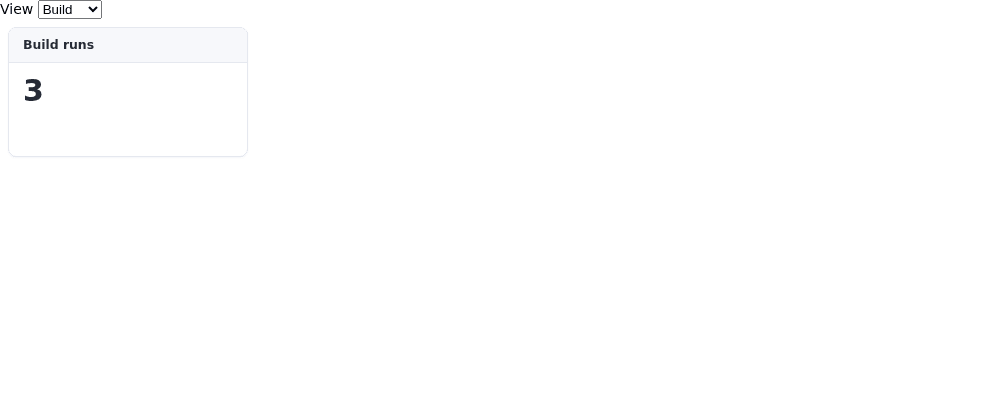
[`DashboardViewSpec`](https://bench-grafloria-61d.atloria.app/p/bench-grafloria-61d-mQCmWpDrxv/developer/grafloria-element-dashboard-kit-interfaces#dashboardviewspec) describes the initial views. The dashboard's `ready` event supplies its handle; its template ref exposes `getHandle()` and `snapshot()`. Use `layoutChange` for committed widget-layout changes rather than assuming the initial `views` array reflects gestures. Continue with [Build a dashboard](https://bench-grafloria-61d.atloria.app/p/bench-grafloria-61d-mQCmWpDrxv/developer/build-dashboard) for widget slots and board persistence.
## Options that matter
| Option | Type | Default | What it does |
| --- | --- | --- | --- |
| `nodes`, `edges` | `NodeSpec[]`, `EdgeSpec[]` | `undefined` | Controlled inputs; pair them with their `v-model` return paths. |
| `defaultNodes`, `defaultEdges` | `NodeSpec[]`, `EdgeSpec[]` | `undefined` | Seed an uncontrolled flow at mount. |
| `layout` | Registry name or `{ name, options }` | `undefined` | Request layout at mount and when its value changes. |
| `comments` | `boolean` or shared store object | `undefined` | `true` creates a comment store; an object shares one. |
| Dashboard `activeView` | `string` | `undefined` | Select a view through `v-model:active-view`. |
| Dashboard `layout` | `'grid'` or `'split'` | `undefined` | Override the board layout and switch it live: cell grid or splitter tree. |
| Dashboard `sizing` | `'fit'` or `'grow'` | `undefined` | Override sizing: fit the board or allow it to grow. |
| Dashboard `static` | `boolean` | `undefined` | Enable the viewer mode without drag or resize handles. |
## Pitfalls and related tasks
- Treat controlled specs as a projection, not the persistence format. [Save and restore documents](https://bench-grafloria-61d.atloria.app/p/bench-grafloria-61d-mQCmWpDrxv/developer/save-and-restore) covers the fidelity boundary.
- Existing ids preserve live models during reconciliation. For externally replaced data, follow [Edit nodes from your UI](https://bench-grafloria-61d.atloria.app/p/bench-grafloria-61d-mQCmWpDrxv/developer/edit-nodes).
- Request a new layout intentionally after data changes; see [Lay out a diagram](https://bench-grafloria-61d.atloria.app/p/bench-grafloria-61d-mQCmWpDrxv/developer/lay-out-diagram).
- For live model-derived content, see [Compute connected data](https://bench-grafloria-61d.atloria.app/p/bench-grafloria-61d-mQCmWpDrxv/developer/compute-connected-data). App-owned reactive content uses the component pattern above.
- For resolved canvas dimensions inside nested layouts, see [Nest containers and lanes](https://bench-grafloria-61d.atloria.app/p/bench-grafloria-61d-mQCmWpDrxv/developer/nest-containers).