# Vue quick start
Mount a Vue canvas with two connected nodes, keep its specs in typed refs, and capture the mounted instance through `@init`.
Framework bindings are thin skins over one headless model: specs describe your intent, live models hold the data, and the engine owns behavior.
## Prerequisites
Use a browser-based Vue TypeScript project with single-file component support. This example assumes your project has an `npm run dev` script, as a Vite Vue project does.
The Vue binding's peer dependencies are Vue `^3.4.0`, engine `^0.4.0`, renderer `^0.5.0`, and element `^0.5.0`.
## 1. Install the binding and its peers
Run this in your project:
```bash
npm install @grafloria/vue @grafloria/engine @grafloria/renderer vue @grafloria/element
```
You now have the Vue component and the shared engine and renderer packages it uses.
## 2. Mount a controlled canvas
Replace `src/App.vue` with this Vue single-file component, supplying [`GrafloriaFlow`](https://bench-grafloria-61d.atloria.app/p/bench-grafloria-61d-mQCmWpDrxv/developer/grafloria-vue#grafloriaflow) through refs typed with [`NodeSpec`](https://bench-grafloria-61d.atloria.app/p/bench-grafloria-61d-mQCmWpDrxv/developer/grafloria-renderer-instance-nodespec#nodespec) and [`EdgeSpec`](https://bench-grafloria-61d.atloria.app/p/bench-grafloria-61d-mQCmWpDrxv/developer/grafloria-renderer-instance-edgespec#edgespec); see the [React quick start](https://bench-grafloria-61d.atloria.app/p/bench-grafloria-61d-mQCmWpDrxv/developer/react-quick-start#2-create-the-controlled-canvas) for the shared canvas and endpoint setup.
`v-model:nodes` and `v-model:edges` supply the controlled props and write the component's emitted spec updates back into your refs. The `init` event supplies the mounted [`DiagramInstance`](https://bench-grafloria-61d.atloria.app/p/bench-grafloria-61d-mQCmWpDrxv/developer/grafloria-renderer-instance-diagraminstance#diagraminstance). Keep it in a `shallowRef` and call `fitView()` to frame the content.
```vue title="src/App.vue"
{{ instance ? 'Canvas ready' : 'Mounting canvas' }}
```
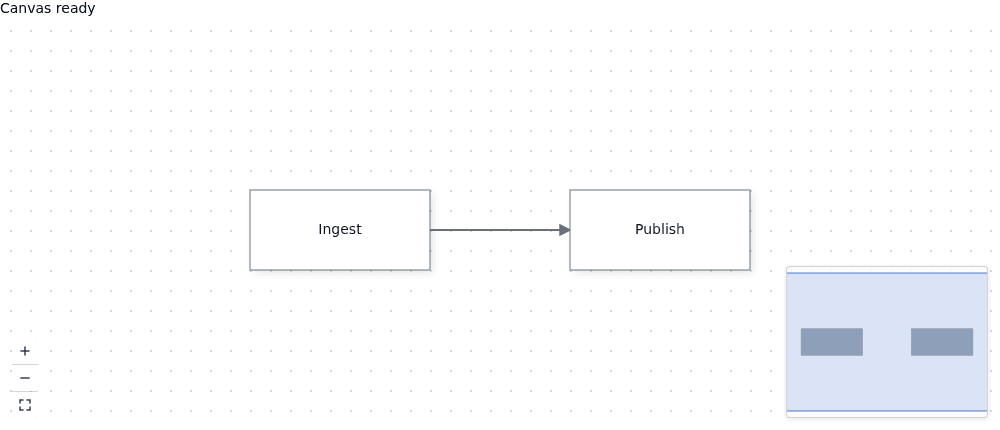
You get an **Ingest** node connected to a **Publish** node. `:plugins="true"` adds the shipped minimap, zoom/fit controls, and background grid; the component loads these plugins lazily. No stylesheet import is needed.
For a self-contained canvas whose data the instance owns, use `:default-nodes` and `:default-edges` instead of the two `v-model` bindings. Those defaults seed the instance once at mount. For more on the return path and composables, see [Vue: state and composables](https://bench-grafloria-61d.atloria.app/p/bench-grafloria-61d-mQCmWpDrxv/developer/vue-state-and-composables).
## 3. Open the editor
Start your project's development server and open the local URL it prints:
```bash
npm run dev
```
Look for **Canvas ready**, the two labelled nodes, and their connecting edge. Drag a node to move it; use the canvas controls to zoom or fit the view. The Vue component disposes its instance and plugins when it unmounts—do not dispose the instance in `onInit`.
Explore the [live Vue demos](https://grafloria.com/demos-vue/) for running examples with Vue SFC source.
## Replacing externally edited specs
Ordinary controlled updates reconcile into existing live objects rather than remounting the canvas. A full replacement with reused ids needs a different sequence.
> **Known issue:** Replacing specs with reused node ids can retain old ports and metadata: the existing-node update path does not rebuild ports or remove omitted metadata. Until it is fixed, clear edges and nodes, await `nextTick()`, then apply the replacement.
The intended direct assignments are `nodes.value = importedNodes` and `edges.value = importedEdges`. For a fresh import, use this helper instead; pass the refs from your component and the imported spec arrays. It leaves the replacement diagram on the mounted canvas.
```ts title="src/replace-specs.ts"
import { nextTick, type Ref } from 'vue';
import type { NodeSpec, EdgeSpec } from '@grafloria/vue';
export async function replaceSpecs(
nodes: Ref,
edges: Ref,
importedNodes: NodeSpec[],
importedEdges: EdgeSpec[],
): Promise {
edges.value = [];
nodes.value = [];
await nextTick();
nodes.value = importedNodes;
edges.value = importedEdges;
await nextTick();
}
```
The first `nextTick()` lets the empty lists reconcile before you apply the replacement. Without that boundary, Vue batches the assignments and the watchers see only the final lists.
## Where next
You now have a sized, controlled Vue canvas and access to its mounted instance.
- [Vue: slots and widgets](https://bench-grafloria-61d.atloria.app/p/bench-grafloria-61d-mQCmWpDrxv/developer/vue-slots-and-widgets) explains custom node content.
- [Instance and lifecycle](https://bench-grafloria-61d.atloria.app/p/bench-grafloria-61d-mQCmWpDrxv/developer/instance-and-lifecycle) explains the instance's renderer and engine access.
- [Save and restore documents](https://bench-grafloria-61d.atloria.app/p/bench-grafloria-61d-mQCmWpDrxv/developer/save-and-restore-documents) covers persistence beyond framework specs.
- [Theme a canvas](https://bench-grafloria-61d.atloria.app/p/bench-grafloria-61d-mQCmWpDrxv/developer/theme-a-canvas) covers container sizing and visual configuration.