# React: state and subscriptions
Use controlled state when application UI needs the graph; use subscriptions when a toolbar or inspector needs the live selection or camera. The React binding forwards your specs into live models and returns committed edits through callbacks—it does not implement diagram behavior in React.
This example renders two connected nodes, a sibling Fit button, a selection inspector, a camera readout, and node coordinates backed by React state.
Install the binding and its peers in your React project:
```bash
npm install @grafloria/react @grafloria/engine @grafloria/renderer @grafloria/element react react-dom
```
## 1. Choose the state owner
[`GrafloriaFlow`](https://bench-grafloria-61d.atloria.app/p/bench-grafloria-61d-mQCmWpDrxv/developer/grafloria-react#grafloriaflow) supports two ownership paths:
| Ownership | Props | What you get |
|---|---|---|
| Uncontrolled | `defaultNodes`, `defaultEdges` | The props seed the instance at mount. Later default arrays do not update it; use instance methods for subsequent changes. |
| Controlled | `nodes` with `onNodesChange`, `edges` with `onEdgesChange` | React owns plain specs, and the binding reconciles new arrays into the live model. Callbacks return model changes to React. |
Choose uncontrolled for a self-contained viewer or editor. Choose controlled when your application needs graph-derived UI or a server round-trip. For persistence, save the live document rather than the React projection; see [Save and restore documents](https://bench-grafloria-61d.atloria.app/p/bench-grafloria-61d-mQCmWpDrxv/developer/save-and-restore-documents).
[`useNodesState`](https://bench-grafloria-61d.atloria.app/p/bench-grafloria-61d-mQCmWpDrxv/developer/grafloria-react#usenodesstate) returns `[nodes, setNodes, onNodesChange]`. [`useEdgesState`](https://bench-grafloria-61d.atloria.app/p/bench-grafloria-61d-mQCmWpDrxv/developer/grafloria-react#useedgesstate) returns the equivalent edge tuple:
- The first element contains plain [`NodeSpec`](https://bench-grafloria-61d.atloria.app/p/bench-grafloria-61d-mQCmWpDrxv/developer/grafloria-renderer-instance-nodespec#nodespec) or [`EdgeSpec`](https://bench-grafloria-61d.atloria.app/p/bench-grafloria-61d-mQCmWpDrxv/developer/grafloria-renderer-instance-edgespec#edgespec) values to pass to the component.
- The second element is a React state setter: use it to write application intent as specs.
- The third element accepts the engine's live models and converts them back to specs. Pass it to the matching change callback to close the return leg.
For the controlled-component pitfall, see the [React quick start](https://bench-grafloria-61d.atloria.app/p/bench-grafloria-61d-mQCmWpDrxv/developer/react-quick-start). The example below wires both return legs.
## 2. Share the instance with siblings and subscribe
Wrap the canvas and its sibling consumers in [`GrafloriaProvider`](https://bench-grafloria-61d.atloria.app/p/bench-grafloria-61d-mQCmWpDrxv/developer/grafloria-react#grafloriaprovider). [`useGrafloria`](https://bench-grafloria-61d.atloria.app/p/bench-grafloria-61d-mQCmWpDrxv/developer/grafloria-react#usegrafloria) returns the live [`DiagramInstance`](https://bench-grafloria-61d.atloria.app/p/bench-grafloria-61d-mQCmWpDrxv/developer/grafloria-renderer-instance-diagraminstance#diagraminstance), or `null` before the canvas mounts. Disable instance-dependent controls while it is `null`.
Use [`useSelection`](https://bench-grafloria-61d.atloria.app/p/bench-grafloria-61d-mQCmWpDrxv/developer/grafloria-react#useselection) for rendered selection state and [`useViewport`](https://bench-grafloria-61d.atloria.app/p/bench-grafloria-61d-mQCmWpDrxv/developer/grafloria-react#useviewport) for `{ zoom, x, y }`. If a consumer needs a callback rather than the current state, use [`useOnSelectionChange`](https://bench-grafloria-61d.atloria.app/p/bench-grafloria-61d-mQCmWpDrxv/developer/grafloria-react#useonselectionchange). Its inline handler stays current through a ref without resubscribing on each render. A consumer colocated with the canvas can instead use its `onSelectionChange` callback prop.
Replace your application's `App.tsx` with this component:
```tsx title="App.tsx"
import { useState } from 'react';
import {
GrafloriaFlow,
GrafloriaProvider,
useEdgesState,
useGrafloria,
useNodesState,
useOnSelectionChange,
useSelection,
useViewport,
} from '@grafloria/react';
import type { EdgeSpec, NodeSpec } from '@grafloria/renderer';
const initialNodes: NodeSpec[] = [
{
id: 'extract', label: 'Extract',
position: { x: 80, y: 100 }, size: { width: 150, height: 66 },
},
{
id: 'load', label: 'Load',
position: { x: 330, y: 180 }, size: { width: 150, height: 66 },
},
];
const initialEdges: EdgeSpec[] = [
{ id: 'pipeline', source: 'extract', target: 'load' },
];
function Inspector() {
const instance = useGrafloria();
const selection = useSelection();
const { zoom, x, y } = useViewport();
const [selectionEvents, setSelectionEvents] = useState(0);
useOnSelectionChange(() => setSelectionEvents((count) => count + 1));
return (
);
}
function Editor() {
const [nodes, setNodes, onNodesChange] = useNodesState(initialNodes);
const [edges, , onEdgesChange] = useEdgesState(initialEdges);
return (
<>
);
}
export default function App() {
return (
);
}
```
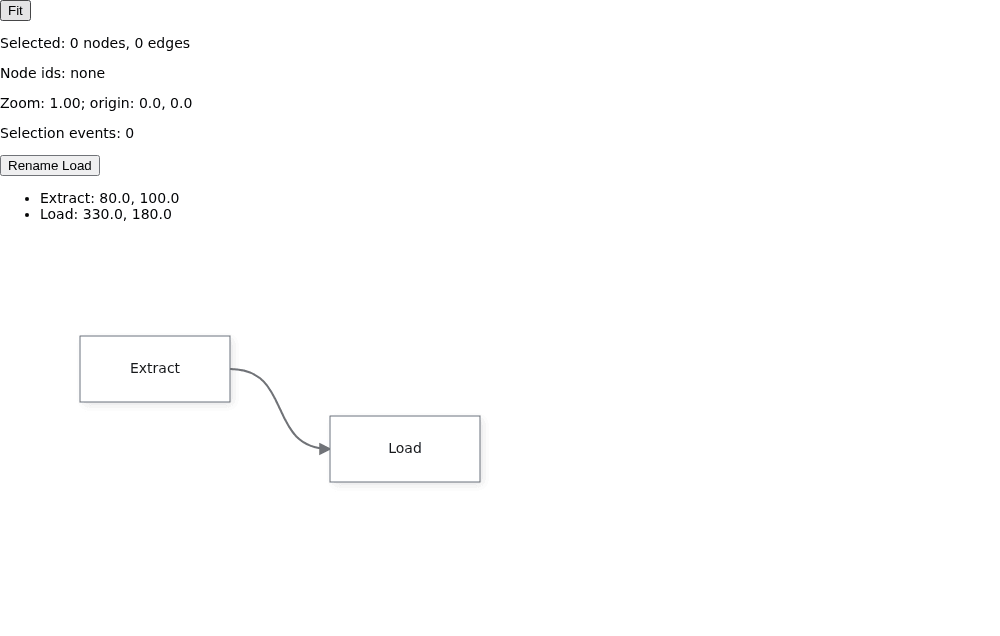
Click a node to update the selection inspector and event counter. Drag a node and release it: the coordinate list catches up through `onNodesChange`. Click Rename Load to send a new spec array into the canvas; the second node's label becomes “Load records”. Click Fit to frame the content through the same instance the canvas uses; the camera readout follows viewport changes.
The return path reports document changes at commit points, not every frame of a drag. During the gesture, the core moves the model and paints the canvas directly. Keep the controlled arrays in state or memoize them: their reference is the effect dependency. A new array triggers reconciliation, not a remount; nodes with matching ids keep their live objects.
If the consumer is in the same component as the canvas, capture the instance with `onInit` in a React ref instead. Consumers passed as `GrafloriaFlow` children already have access to the flow's own store and need no outer provider. Siblings do need the shared provider shown above.
The binding refreshes callback refs on each render and keeps the instance for the mounted canvas. It unsubscribes and disposes the instance on unmount; the subscription hooks also return their unsubscribe functions from effects.
## 3. Adopt server markup at client mount
For an SSR application, call [`renderToStaticSVG`](https://bench-grafloria-61d.atloria.app/p/bench-grafloria-61d-mQCmWpDrxv/developer/grafloria-renderer-core#rendertostaticsvg) on the server. It returns the layer `html`, standalone `svg`, stylesheet `css`, and hydration `snapshot`. Pass the result to `ssr` with the same node and edge specs, and include its stylesheet so the diagram is styled before client JavaScript runs.
Here is a Next.js App Router example. The server page passes a serializable [`StaticRenderResult`](https://bench-grafloria-61d.atloria.app/p/bench-grafloria-61d-mQCmWpDrxv/developer/grafloria-renderer-core#staticrenderresult) into a client component; the client mounts the flow and exposes a Fit button through the provider.
```tsx title="app/page.tsx"
import { renderToStaticSVG } from '@grafloria/renderer';
import type { EdgeSpec, NodeSpec } from '@grafloria/renderer';
import HydratedFlow from './HydratedFlow';
export default function Page() {
const nodes: NodeSpec[] = [
{
id: 'extract', label: 'Extract',
position: { x: 80, y: 100 }, size: { width: 150, height: 66 },
},
{
id: 'load', label: 'Load',
position: { x: 330, y: 180 }, size: { width: 150, height: 66 },
},
];
const edges: EdgeSpec[] = [
{ id: 'pipeline', source: 'extract', target: 'load' },
];
const ssr = renderToStaticSVG({
nodes, edges, width: 800, height: 400, instanceId: 'pipeline-ssr',
});
return (
<>
);
}
```
```tsx title="app/HydratedFlow.tsx"
'use client';
import { GrafloriaFlow, GrafloriaProvider, useGrafloria } from '@grafloria/react';
import type { EdgeSpec, NodeSpec, StaticRenderResult } from '@grafloria/renderer';
function FitButton() {
const instance = useGrafloria();
return (
);
}
export default function HydratedFlow({ nodes, edges, ssr }: {
nodes: NodeSpec[];
edges: EdgeSpec[];
ssr: StaticRenderResult;
}) {
return (
);
}
```
The server response contains the two nodes and their connecting edge. At client mount, the flow creates its live instance using the snapshot and adopts the existing diagram DOM instead of rebuilding it. After mount, you can select and drag nodes and use Fit. This version uses uncontrolled defaults: client-side edits belong to the instance.
The flow freezes the initial SSR markup for the component's lifetime. Later `ssr` values do not replace the DOM the instance owns. Custom HTML nodes are absent from the server render and mount on the client; built-in nodes, ports, edges, labels, and routing are present in the SVG.
## Options that matter
The ownership and hydration props belong to [`GrafloriaFlowProps`](https://bench-grafloria-61d.atloria.app/p/bench-grafloria-61d-mQCmWpDrxv/developer/grafloria-react#grafloriaflowprops). The callback types use [`NodeModel`](https://bench-grafloria-61d.atloria.app/p/bench-grafloria-61d-mQCmWpDrxv/developer/grafloria-engine-models-nodemodel#nodemodel) and [`LinkModel`](https://bench-grafloria-61d.atloria.app/p/bench-grafloria-61d-mQCmWpDrxv/developer/grafloria-engine-models-linkmodel#linkmodel), not spec arrays. The [`HydrationSnapshot`](https://bench-grafloria-61d.atloria.app/p/bench-grafloria-61d-mQCmWpDrxv/developer/grafloria-renderer-core#hydrationsnapshot) carries the instance scope, dimensions, zoom, and camera origin.
| Option | Type | Default | What it does |
|---|---|---|---|
| `nodes` / `edges` | `NodeSpec[]` / `EdgeSpec[]` | Omitted | Controls the corresponding data; new array references reconcile into the instance. |
| `defaultNodes` / `defaultEdges` | `NodeSpec[]` / `EdgeSpec[]` | Empty arrays when no controlled inputs exist | Seeds the initial model only. |
| `onNodesChange` / `onEdgesChange` | `(nodes: NodeModel[]) => void` / `(edges: LinkModel[]) => void` | Omitted | Receives live models; the state hooks supply the model-to-spec return handlers. |
| `onInit` | `(instance: DiagramInstance) => void` | Omitted | Receives the instance after the flow publishes it to its store. |
| `ssr` | `{ html: string; snapshot: HydrationSnapshot }` | Omitted | Emits initial server markup and supplies the snapshot for DOM adoption. |
Give each server-rendered diagram on a page a distinct `instanceId`.
## Live demos and related guides
- [React drag and undo demo](https://grafloria.com/demos-react/#/interaction/drag-undo): use toolbar actions against a mounted canvas.
- [Server-side export demo](https://grafloria.com/demos/misc/server-side-export.html): inspect a headless SVG result. This is an image preview, not an interactive hydration example.
- [Save and restore demo](https://grafloria.com/demos/interaction/save-and-restore.html): explore live-model persistence rather than saving React projections.
- [State and event flow](https://bench-grafloria-61d.atloria.app/p/bench-grafloria-61d-mQCmWpDrxv/developer/state-and-event-flow): follow the shared spec/model event paths.
- [Commands and history](https://bench-grafloria-61d.atloria.app/p/bench-grafloria-61d-mQCmWpDrxv/developer/commands-and-history): make application editing actions join the engine's undo stack.
- [Theme a canvas](https://bench-grafloria-61d.atloria.app/p/bench-grafloria-61d-mQCmWpDrxv/developer/theme-a-canvas): configure appearance and container sizing.