# Qwik: resumable integration
Use this integration when your Qwik City page needs a diagram in the server response, sibling controls that subscribe to the live instance, or kits built in the browser. Specs express your data; the diagram owns live models, and the engine owns behavior. Keep the server-rendered data serializable and create live objects in the browser.
Start from the project left by the [Qwik quick start](https://bench-grafloria-61d.atloria.app/p/bench-grafloria-61d-mQCmWpDrxv/developer/qwik-quick-start). Keep its root, entry files, stylesheets, Qwik City plugin and optimizer configuration. The examples below add routes to that project, rather than replacing its generated files. The quick start already installs these packages; install them only if they are missing:
```bash
npm install -D @grafloria/qwik @grafloria/element @grafloria/renderer @grafloria/engine
```
## 1. Configure the build integration
The Qwik optimizer compiles Grafloria's components and QRL handlers. Your existing `qwikVite()` and `qwikCity()` plugins provide the required integration; no Grafloria plugin is required for development, server rendering or production builds.
For development pre-bundling, add the optional [`grafloriaQwik`](https://bench-grafloria-61d.atloria.app/p/bench-grafloria-61d-mQCmWpDrxv/developer/grafloria-qwik-vite#grafloriaqwik) plugin. It includes the engine, renderer and element dependencies in Vite's dependency optimizer. Production builds are identical with or without it.
Add this helper file:
```ts title="grafloria-vite.ts"
import { grafloriaQwik } from '@grafloria/qwik/vite';
export const grafloriaPlugins = [grafloriaQwik()];
```
In the existing `vite.config.ts`, add `import { grafloriaPlugins } from './grafloria-vite';` and append `...grafloriaPlugins` to its existing `plugins` array. Keep every existing plugin and configuration setting. The `default` export provides the same factory as a default import, [`vite`](https://bench-grafloria-61d.atloria.app/p/bench-grafloria-61d-mQCmWpDrxv/developer/grafloria-qwik-vite#default): `import vite from '@grafloria/qwik/vite'`. Use one form, not both.
If you prefer the default import, use this alternative helper instead:
```ts title="grafloria-vite.ts"
import vite from '@grafloria/qwik/vite';
export const grafloriaPlugins = [vite()];
```
## 2. Resume server-rendered diagram markup
[`renderToStaticSVG`](https://bench-grafloria-61d.atloria.app/p/bench-grafloria-61d-mQCmWpDrxv/developer/grafloria-renderer-core#rendertostaticsvg) runs the engine and SVG renderer on the server without a DOM. Its [`StaticRenderResult`](https://bench-grafloria-61d.atloria.app/p/bench-grafloria-61d-mQCmWpDrxv/developer/grafloria-renderer-core#staticrenderresult) carries `html`, `svg`, `css` and a hydration snapshot. Pass the result to [`GrafloriaFlow`](https://bench-grafloria-61d.atloria.app/p/bench-grafloria-61d-mQCmWpDrxv/developer/grafloria-qwik#grafloriaflow) through `ssr`, with the same node and edge data. The browser creates a live instance and adopts the server's diagram DOM instead of rebuilding it.
1. Use the same plain data on the server and in the browser. [`NodeSpec`](https://bench-grafloria-61d.atloria.app/p/bench-grafloria-61d-mQCmWpDrxv/developer/grafloria-renderer-instance-nodespec) and [`EdgeSpec`](https://bench-grafloria-61d.atloria.app/p/bench-grafloria-61d-mQCmWpDrxv/developer/grafloria-renderer-instance-edgespec) type the arrays in both environments. The route below declares them alongside the component.
2. Add the route below. Its server task renders the diagram once and retains the plain result for resume. The component emits the returned CSS in a style element and passes the same result to the flow.
[`GrafloriaProvider`](https://bench-grafloria-61d.atloria.app/p/bench-grafloria-61d-mQCmWpDrxv/developer/grafloria-qwik#grafloriaprovider) publishes the flow's instance to sibling components. [`useGrafloria`](https://bench-grafloria-61d.atloria.app/p/bench-grafloria-61d-mQCmWpDrxv/developer/grafloria-qwik#usegrafloria) returns its live-instance signal; [`useSelection`](https://bench-grafloria-61d.atloria.app/p/bench-grafloria-61d-mQCmWpDrxv/developer/grafloria-qwik#useselection) and [`useViewport`](https://bench-grafloria-61d.atloria.app/p/bench-grafloria-61d-mQCmWpDrxv/developer/grafloria-qwik#useviewport) return reactive subscriptions. Read `.value` in the toolbar rather than copying selection or camera state in button handlers.
```tsx title="src/routes/resumable/index.tsx"
import { component$, noSerialize, useSignal, useTask$ } from '@builder.io/qwik';
import type { NoSerialize } from '@builder.io/qwik';
import { isServer } from '@builder.io/qwik/build';
import {
GrafloriaCommentPanel,
GrafloriaFlow,
GrafloriaProvider,
useGrafloria,
useSelection,
useViewport,
useOnSelectionChange$,
} from '@grafloria/qwik';
import type { CommentStore } from '@grafloria/engine';
import { renderToStaticSVG } from '@grafloria/renderer';
import type { DiagramInstance, NodeSpec, EdgeSpec, StaticRenderResult } from '@grafloria/renderer';
const nodes: NodeSpec[] = [
{
id: 'plan',
position: { x: 80, y: 120 },
size: { width: 160, height: 64 },
label: 'Plan',
},
{
id: 'ship',
position: { x: 380, y: 120 },
size: { width: 160, height: 64 },
label: 'Ship',
},
];
const edges: EdgeSpec[] = [
{ id: 'plan-ship', source: 'plan', target: 'ship' },
];
const Toolbar = component$(() => {
const instance = useGrafloria();
const selection = useSelection();
const viewport = useViewport();
useOnSelectionChange$((change) => {
console.log('Selection changed:', change.nodes.map((node) => node.id));
});
return (
{ currentNodes.value = next; }}
onEdgesChange$={(next: EdgeSpec[]) => { currentEdges.value = next; }}
onNodeClick$={({ node }) => { console.log('Node clicked:', node.id); }}
onInit$={(instance: DiagramInstance) => {
const store = instance.getCommentStore();
if (store) {
store.createThread(
{ kind: 'node', id: 'plan' },
'Confirm the plan before shipping.',
);
comments.value = noSerialize(store);
}
}}
/>
{comments.value && (
)}
);
});
```
3. Run `npm run dev` and open `/resumable/` at the address printed by the server. View the page source: the diagram's SVG is already in the response. In the browser, Plan connects to Ship; the toolbar shows selection and zoom, and the comment panel shows the seeded conversation. Click a node to change the selection readout. Fit view frames the current content when you request it; it is not a post-mount refresh step.
The flow mounts its browser-only task on document ready, not on the first interaction. That task publishes the [`DiagramInstance`](https://bench-grafloria-61d.atloria.app/p/bench-grafloria-61d-mQCmWpDrxv/developer/grafloria-renderer-instance-diagraminstance), so the toolbar becomes available without waiting for a click. The binding disposes the instance and its subscriptions on unmount.
Built-in nodes, edges, ports and labels appear in the server SVG. Custom HTML nodes mount in the browser inside the HTML layer supplied by the server. Keep custom node and dashboard widget components self-contained: each mounts in a separate Qwik container and cannot read contexts from the surrounding app. Feed them through their data payloads; see [custom rendering](https://bench-grafloria-61d.atloria.app/p/bench-grafloria-61d-mQCmWpDrxv/developer/custom-rendering).
## 3. Keep live objects out of serialized state
[`GrafloriaCommentPanel`](https://bench-grafloria-61d.atloria.app/p/bench-grafloria-61d-mQCmWpDrxv/developer/grafloria-qwik#grafloriacommentpanel) takes a live [`CommentStore`](https://bench-grafloria-61d.atloria.app/p/bench-grafloria-61d-mQCmWpDrxv/developer/grafloria-engine-comments#commentstore), not a serialized thread list. In the preceding route, `comments` enables the flow's store, `commentsViewer` identifies its viewer, and `getCommentStore()` retrieves it after initialization. `createThread()` creates a node-anchored conversation and returns its thread id. The panel subscribes to changes and tears down that subscription on unmount.
Wrap a store you retain with `noSerialize()`, as the route does. Qwik cannot serialize subscriber stores or transports into resumable state. Create them in a browser-only task or a browser callback such as `onInit$`, and mark every live object you keep in a signal or store with `noSerialize()`. A marked value becomes `undefined` on resume; recreate it in the browser rather than expecting it to arrive from the server. The provider already marks its instance this way. For transport setup, follow [collaboration](https://bench-grafloria-61d.atloria.app/p/bench-grafloria-61d-mQCmWpDrxv/developer/sync-collaborators).
For selection-driven side effects in a sibling component, [`useOnSelectionChange$`](https://bench-grafloria-61d.atloria.app/p/bench-grafloria-61d-mQCmWpDrxv/developer/grafloria-qwik#useonselectionchange) invokes a QRL on each selection change and handles subscription cleanup. Use `useSelection()` for rendered selection state. When the handler belongs to the flow's own component, prefer its `onSelectionChange$` callback prop.
The route returns controlled data through `onNodesChange$` and `onEdgesChange$`; the latter reports edge changes as specs. `onNodeClick$` reports the clicked node. `onEdgeClick$` reports the clicked edge, and `onConnect$` reports a newly created connection. For layout completion callbacks, see [lay out a diagram](https://bench-grafloria-61d.atloria.app/p/bench-grafloria-61d-mQCmWpDrxv/developer/lay-out-diagram); for the collaboration-ready callback, see [sync collaborators](https://bench-grafloria-61d.atloria.app/p/bench-grafloria-61d-mQCmWpDrxv/developer/sync-collaborators).
## 4. Build kit specs through `spec$`
[`GrafloriaDiagram`](https://bench-grafloria-61d.atloria.app/p/bench-grafloria-61d-mQCmWpDrxv/developer/grafloria-qwik#grafloriadiagram) hosts kit specs. [`erDiagram`](https://bench-grafloria-61d.atloria.app/p/bench-grafloria-61d-mQCmWpDrxv/developer/grafloria-element-diagram-kit-functions#erdiagram) builds table cards and relationship edges, including a function-bearing wiring step. Build that result inside `spec$`, not during server rendering and not through `spec`.
Add this route. It draws Customer and Order cards with a field-level connection. The button adds a schema column by changing the component key and building a new kit instance. The example is a schema preview, not an editor that retains user changes.
```tsx title="src/routes/kit-preview/index.tsx"
import { component$, useSignal } from '@builder.io/qwik';
import { GrafloriaDiagram } from '@grafloria/qwik';
import { erDiagram } from '@grafloria/element';
import type { ErDiagramOptions } from '@grafloria/element';
export default component$(() => {
const schemaVersion = useSignal(1);
const ready = useSignal(false);
return (
{ ready.value = true; }}
spec$={() => {
const options: ErDiagramOptions = {
entities: [
{
id: 'Customer',
position: { x: 60, y: 80 },
columns: [
{ name: 'id', type: 'int', pk: true },
...(schemaVersion.value === 2
? [{ name: 'email', type: 'varchar' }]
: []),
],
},
{
id: 'Order',
position: { x: 380, y: 80 },
columns: [
{ name: 'id', type: 'int', pk: true },
{ name: 'customer_id', type: 'int', fk: true },
],
},
],
relationships: [
{ from: 'Customer.id', to: 'Order.customer_id' },
],
};
return erDiagram(options);
}}
/>
);
});
```
Open `/kit-preview/`. Initially Customer contains `id`; after Add email column, it also contains `email`. [`ErDiagramOptions`](https://bench-grafloria-61d.atloria.app/p/bench-grafloria-61d-mQCmWpDrxv/developer/grafloria-element-diagram-kit-interfaces#erdiagramoptions) types the kit input. `ENTITY.column` relationship endpoints attach to those rows.
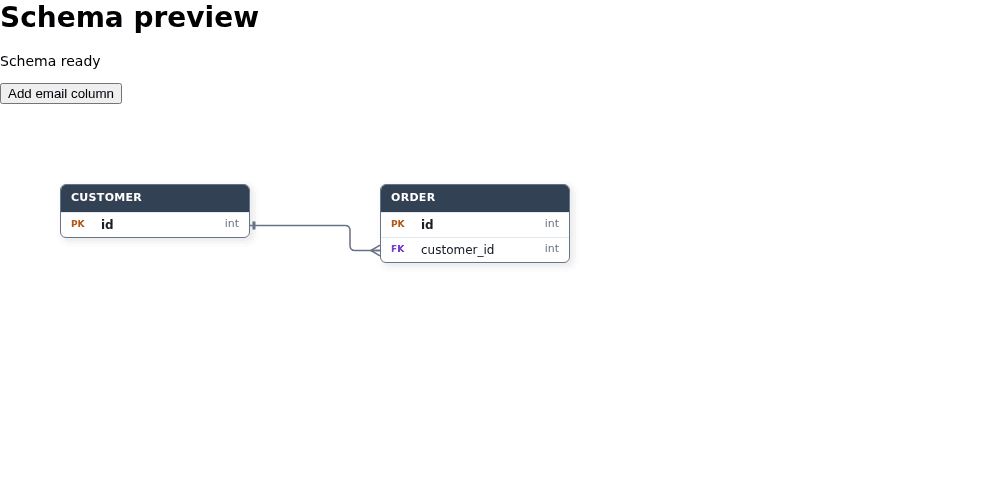
`spec$` builds once at mount because Qwik fixes `$` props for the component's lifetime. Change `key` when you need a newly built spec from changed data. Plain-data `{ nodes, edges }` specs and JSON/DSL strings can use `spec`; function-bearing kit specs cannot survive server serialization. This rule also applies to UML and dashboard kit builders. Do not wrap a server-built kit spec in `noSerialize()`: it reaches the browser as `undefined`.
## 5. Pass dashboard data to the dashboard component
For a dashboard, use [`GrafloriaDashboard`](https://bench-grafloria-61d.atloria.app/p/bench-grafloria-61d-mQCmWpDrxv/developer/grafloria-qwik#grafloriadashboard) directly. It accepts serializable widget data and builds the shipped dashboard kit in its browser-only task. Kinds without a custom component use the shipped widget painters.
```tsx title="src/routes/dashboard-preview/index.tsx"
import { component$, useSignal } from '@builder.io/qwik';
import { GrafloriaDashboard } from '@grafloria/qwik';
import type { DashboardWidgetSpec } from '@grafloria/element';
export default component$(() => {
const widgets = useSignal([
{
id: 'orders',
kind: 'kpi',
span: 4,
data: { label: 'Orders', value: '128' },
},
{
id: 'revenue',
kind: 'kpi',
span: 4,
data: { label: 'Revenue', value: '$6,800' },
},
]);
return (
Dashboard preview
);
});
```
Open `/dashboard-preview/` to see the Orders and Revenue KPI tiles. [`DashboardWidgetSpec`](https://bench-grafloria-61d.atloria.app/p/bench-grafloria-61d-mQCmWpDrxv/developer/grafloria-element-dashboard-kit-dashboardwidgetspec) types the payload. No app-owned painter or live kit handle crosses the server boundary. See [build a dashboard](https://bench-grafloria-61d.atloria.app/p/bench-grafloria-61d-mQCmWpDrxv/developer/build-dashboard) for views, custom widgets and layout changes.
## Options that matter at the server boundary
| Option | Type | Default | What it does |
| --- | --- | --- | --- |
| `GrafloriaFlow.ssr` | `{ html, snapshot }` | Omitted | Emits server markup and supplies the snapshot for client DOM adoption. |
| `GrafloriaDiagram.spec` | `RenderSpec` | Omitted | Supplies plain data or text; changed data or options replace the diagram. |
| `GrafloriaDiagram.spec$` | `QRL<() => RenderSpec \| Promise>` | Omitted | Builds a kit spec in the browser at mount. |
| `GrafloriaCommentPanel.store` | `NoSerialize` | Required | Connects the panel to a live comment store. |
| `StaticRenderOptions.width` | `number` | `800` | Sets server canvas width in CSS pixels. |
| `StaticRenderOptions.height` | `number` | `600` | Sets server canvas height in CSS pixels. |
| `StaticRenderOptions.instanceId` | `string` | `'grafloria-ssr'` | Sets the diagram's CSS scope; use distinct values for multiple server diagrams. |
| `StaticRenderOptions.fitView` | `boolean` | `false` | Frames the server-rendered content instead of using the supplied camera. |
[`StaticRenderOptions`](https://bench-grafloria-61d.atloria.app/p/bench-grafloria-61d-mQCmWpDrxv/developer/grafloria-renderer-core#staticrenderoptions) defines the server renderer's inputs. Give the mounted component a resolved height; see [container sizing](https://bench-grafloria-61d.atloria.app/p/bench-grafloria-61d-mQCmWpDrxv/developer/nest-containers).
## Run the integration and compare the demo
Run `npm run build` in your Qwik City project to build its client and server output. Keep the starter's server-rendered entry: it supplies Qwik's event loader automatically. A client-only entry that calls Qwik's `render()` instead needs the event loader before mounting, or its DOM event handlers do not dispatch.
Compare the provider subscriptions and server rendering with the [live Qwik demos](https://grafloria.com/demos-qwik/) and their [source](https://github.com/grafloria/grafloria/tree/main/apps/demos-qwik/src/demos), especially toolbar-and-hooks and ssr-resumable.
## Related
- [Instance and lifecycle](https://bench-grafloria-61d.atloria.app/p/bench-grafloria-61d-mQCmWpDrxv/developer/instance-and-lifecycle) covers instance access and teardown.
- [Share presence and comments](https://bench-grafloria-61d.atloria.app/p/bench-grafloria-61d-mQCmWpDrxv/developer/presence-comments-presentation) covers comment authoring and shared conversations.
- [Save and restore documents](https://bench-grafloria-61d.atloria.app/p/bench-grafloria-61d-mQCmWpDrxv/developer/save-and-restore) covers document persistence rather than a server-rendered view snapshot.