# Lay out a diagram
Use a shipped layout when you want a graph arranged from its connections rather than hand-authored coordinates. Start with a left-to-right pipeline, rerun it from a button, then insert a node with an incremental pass that preserves positions outside the affected neighborhood.
Specs describe the graph; the engine owns its geometry. The framework component's `layout` prop selects the initial arrangement. For subsequent work, get the [`DiagramEngine`](https://bench-grafloria-61d.atloria.app/p/bench-grafloria-61d-mQCmWpDrxv/developer/grafloria-engine-engine#diagramengine) through the mounted [`DiagramInstance`](https://bench-grafloria-61d.atloria.app/p/bench-grafloria-61d-mQCmWpDrxv/developer/grafloria-renderer-instance-diagraminstance#diagraminstance) and await `layout()`.
## 1. Choose an algorithm
You do not need to register adapters before using these names.
| Graph | Layout name | What you get |
| --- | --- | --- |
| Flowcharts, pipelines, DAGs | `elk`, `layered`, `dagre` | Layered ranking; ELK also handles ports and nesting. |
| System diagrams with zones | `architecture` | Regions on a grid, boxes sized to their words, and bends in the gutters. |
| Hierarchies, org charts | `tree` | A tidy, parent-centered hierarchy. |
| Networks, clusters | `force`, `community`, `spectral` | Physical spread or grouping by related nodes. |
| Catalogs, galleries | `grid`, `circular`, `radial` | Uniform placement. |
| No predetermined choice | `auto` | Algorithm selection based on the graph. |
An unknown name throws an error listing the registered layouts. Calling `layout()` without a name uses `auto`.
Install the packages for your framework in your own browser application.
JavaScript:
```bash
npm install @grafloria/element @grafloria/engine @grafloria/renderer
```
Angular:
```bash
npm install @grafloria/angular @angular/common @angular/core @angular/forms @angular/platform-browser @grafloria/engine @grafloria/renderer rxjs @grafloria/element
```
Qwik:
```bash
npm install @grafloria/qwik @grafloria/engine @grafloria/renderer @builder.io/qwik @grafloria/element
```
React:
```bash
npm install @grafloria/react @grafloria/engine @grafloria/renderer react react-dom @grafloria/element
```
Vue:
```bash
npm install @grafloria/vue @grafloria/engine @grafloria/renderer vue @grafloria/element
```
## 2. Define a pipeline and its insertion operation
Save this shared file beside the framework sample you choose below. The typed [`NodeSpec`](https://bench-grafloria-61d.atloria.app/p/bench-grafloria-61d-mQCmWpDrxv/developer/grafloria-renderer-instance-nodespec#nodespec) and [`EdgeSpec`](https://bench-grafloria-61d.atloria.app/p/bench-grafloria-61d-mQCmWpDrxv/developer/grafloria-renderer-instance-edgespec#edgespec) arrays describe six connected boxes, initially stacked at the origin. The `layered` layout separates them left to right. [`UnifiedLayoutOptions`](https://bench-grafloria-61d.atloria.app/p/bench-grafloria-61d-mQCmWpDrxv/developer/grafloria-engine-layout-unifiedlayoutoptions#unifiedlayoutoptions) types the shared request's options.
`insertNode()` adds a labeled box and two connections to the live graph. Its incremental pass allows the new box and its immediate neighbors to move, while anchoring the rest. It returns the layout result, including a movement report and a tween plan; the samples repaint the committed positions rather than animate the plan.
This page requires the next release of `@grafloria/engine`: `direction: 'LR'` is unreleased and is not available in version 0.4.0. Use the samples after that release is available.
```ts title="layout-demo.ts"
import type { DiagramEngine, UnifiedLayoutOptions } from '@grafloria/engine';
import type { NodeSpec, EdgeSpec } from '@grafloria/renderer';
export const nodes: NodeSpec[] = ['n0', 'n1', 'n2', 'n3', 'n4', 'n5'].map((id) => ({
id,
label: id,
position: { x: 0, y: 0 },
size: { width: 110, height: 46 },
}));
export const edges: EdgeSpec[] = [
{ id: 'e0', source: 'n0', target: 'n1' },
{ id: 'e1', source: 'n1', target: 'n2' },
{ id: 'e2', source: 'n2', target: 'n3' },
{ id: 'e3', source: 'n3', target: 'n4' },
{ id: 'e4', source: 'n4', target: 'n5' },
];
const options: UnifiedLayoutOptions = { direction: 'LR', nodeSpacing: 40, rankSpacing: 80 };
export const layout = {
name: 'layered',
options,
};
export async function insertNode(engine: DiagramEngine) {
const model = engine.getDiagram();
const source = model?.getNode('n2');
const target = model?.getNode('n4');
const sourcePort = source?.getPorts().find((port) => port.alignment.side === 'right');
const targetPort = target?.getPorts().find((port) => port.alignment.side === 'left');
if (!sourcePort || !targetPort) throw new Error('The pipeline is not mounted');
const inserted = await engine.addNode({
type: 'rect',
position: { x: 0, y: 0 },
size: { width: 110, height: 46 },
});
inserted.setLabel('Inserted');
const input = inserted.getPorts().find((port) => port.alignment.side === 'left');
const output = inserted.getPorts().find((port) => port.alignment.side === 'right');
if (!input || !output) throw new Error('The new node has no side ports');
await engine.addLink({ sourcePortId: sourcePort.id, targetPortId: input.id });
await engine.addLink({ sourcePortId: output.id, targetPortId: targetPort.id });
return engine.layoutIncremental({ changed: [inserted.id], direction: 'LR', radius: 1 });
}
```
The new [`NodeModel`](https://bench-grafloria-61d.atloria.app/p/bench-grafloria-61d-mQCmWpDrxv/developer/grafloria-engine-models-nodemodel#nodemodel) comes from `addNode()`; its default side ports supply the endpoints for `addLink()`. The helper never replaces the existing nodes with their original coordinates. Each inserted node gets the engine's generated id.
## 3. Mount, rerun, and insert
Build on the framework mounting patterns in [Edit nodes](https://bench-grafloria-61d.atloria.app/p/bench-grafloria-61d-mQCmWpDrxv/developer/edit-nodes): here, the layout request arranges the pipeline, and the buttons rerun it or insert a node with an incremental pass.
On load you see `n0` through `n5` arranged left to right. Drag a box, then choose **Rerun layout** to arrange the whole graph again. Choose **Insert node** to add a branch through **Inserted** from `n2` to `n4`; the incremental pass leaves nodes outside that one-hop region in place. The readout reports the total distance traveled by pre-existing nodes, in pixels.
:::code-group
```ts title="JavaScript"
import { render } from '@grafloria/element';
import { nodes, edges, layout, insertNode } from './layout-demo';
export async function mountPipeline(container: HTMLElement): Promise<() => void> {
container.innerHTML = `
Preparing layout
`;
const canvas = container.querySelector('[data-canvas]')!;
const rerun = container.querySelector('[data-rerun]')!;
const insert = container.querySelector('[data-insert]')!;
const report = container.querySelector('[data-report]')!;
const instance = render({ nodes, edges }, canvas);
async function run(add: boolean) {
rerun.disabled = insert.disabled = true;
try {
if (add) {
const result = await insertNode(instance.getEngine());
report.textContent = `Existing nodes moved ${result.movement.total.toFixed(1)} px`;
} else {
const result = await instance.getEngine().layout(layout.name, layout.options);
report.textContent = result.algorithm;
}
instance.fitView(40);
} finally {
rerun.disabled = insert.disabled = false;
}
}
rerun.onclick = () => { void run(false); };
insert.onclick = () => { void run(true); };
await run(false);
return () => { instance.dispose(); container.replaceChildren(); };
}
const container = document.createElement('section');
document.body.appendChild(container);
void mountPipeline(container);
```
```ts title="Angular"
import { ChangeDetectorRef, Component, inject, signal, viewChild } from '@angular/core';
import { DiagramCanvasComponent } from '@grafloria/angular';
import type { NodeSpec, EdgeSpec } from '@grafloria/renderer';
import { nodes, edges, layout, insertNode } from './layout-demo';
@Component({
selector: 'app-root',
standalone: true,
imports: [DiagramCanvasComponent],
template: `
{{ report() }}
`,
})
export class AppComponent {
private readonly cdr = inject(ChangeDetectorRef);
canvas = viewChild.required(DiagramCanvasComponent);
nodes: NodeSpec[] = nodes;
edges: EdgeSpec[] = edges;
layout = layout;
busy = signal(false);
ready = signal(false);
report = signal('Preparing layout');
onLayoutDone() {
this.canvas().fitToContent(40);
this.ready.set(true);
this.report.set('layered');
}
async run(add: boolean) {
const canvas = this.canvas();
const engine = canvas.activeEngine();
if (!engine) return;
this.busy.set(true);
try {
if (add) {
const result = await insertNode(engine);
this.report.set(`Existing nodes moved ${result.movement.total.toFixed(1)} px`);
} else {
await canvas.applyLayout();
}
canvas.scheduleRender();
canvas.fitToContent(40);
} finally {
this.busy.set(false);
this.cdr.detectChanges();
}
}
}
```
```tsx title="Qwik"
import { component$, noSerialize, useSignal, type NoSerialize } from '@builder.io/qwik';
import { GrafloriaFlow, type DiagramInstance } from '@grafloria/qwik';
import { nodes, edges, layout, insertNode } from './layout-demo';
export default component$(() => {
const instance = useSignal>();
const ready = useSignal(false);
const busy = useSignal(false);
const report = useSignal('Preparing layout');
return (
{report.value}
```
:::
The JavaScript sample shows the six-node chain and its two layout buttons.
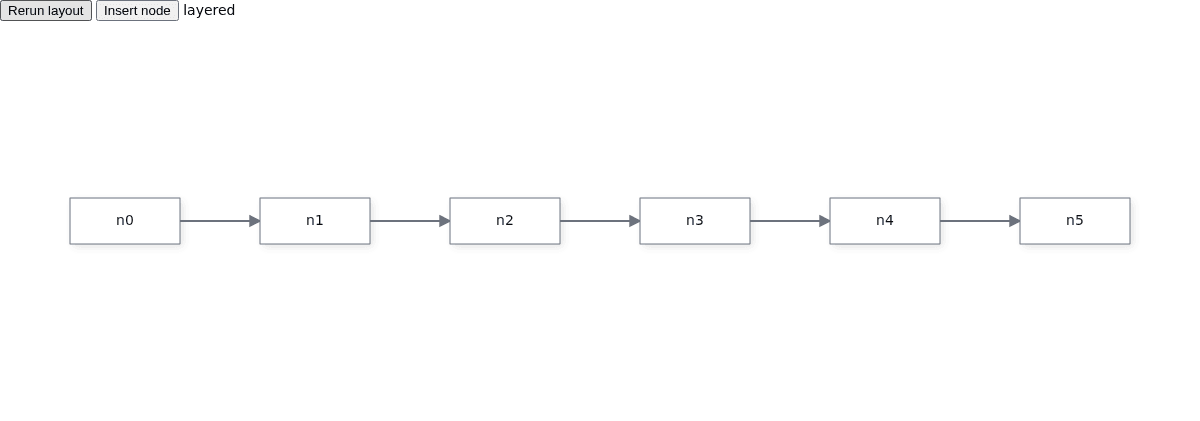
Angular renders the same chain through its canvas component.
Its Rerun layout and Insert node buttons sit above the six connected boxes and the layered readout.
Qwik renders the initial pipeline before any insertion.
React starts with the same layered arrangement.
Vue also starts with all six boxes in a single row.
The JavaScript mount function returns a cleanup function: call it when your application removes this view. Framework bindings own their canvas teardown.
### Why layout does not follow every data change
Changing node data does not rerun the `layout` prop. That is deliberate: a drag can round-trip through your state without an automatic layout undoing the user's placement. Change the layout request to select another algorithm; to rerun the same request, await `instance.getEngine().layout(layout.name, layout.options)`. The canvas repaints the changed positions. In Angular, `applyLayout()` without an argument reruns the bound request and resolves with its result; it returns `undefined` when there is no engine or request.
### Preserve the mental map
Start with `layered` when you intend to use incremental layout. `layoutIncremental()` defaults to that engine because it honors anchors during coordinate assignment. An initial layout from a different engine can require a substantial rearrangement on the first incremental pass.
The result's `movement` measures pre-existing nodes, excluding ids in `changed`. Use `total`, `average`, `max`, and `withinBudget` to judge disruption in your own graph. A budget is measured and reported; do not treat `withinBudget` as a guarantee that the engine refuses an over-budget result. The returned `tween` is a plan for a host-driven animation, not an animation that runs automatically.
## 4. Compose architecture zones
Use `architecture` when the drawing is a composition of regions rather than a graph ranking. Declare zone membership through [`GroupSpec`](https://bench-grafloria-61d.atloria.app/p/bench-grafloria-61d-mQCmWpDrxv/developer/grafloria-renderer-instance#groupspec): `children` contains node ids, and `direction: 'LR'` lays the zone's boxes in a row. Without explicit bounds, a zone fits its children. Relations such as `sourceHandle: 'top'` can place a connected region above another, and a node's `near` relation places a note beside its subject.
This complete JavaScript sample draws a user outside a services zone, with **Auth** and **Billing** inside it. It uses the same shipped composition that the framework `layout="architecture"` prop selects.
```ts title="architecture.ts"
import { render } from '@grafloria/element';
import type { NodeSpec, EdgeSpec, GroupSpec } from '@grafloria/renderer';
export function mountArchitecture(container: HTMLElement): () => void {
container.style.height = '400px';
const nodes: NodeSpec[] = [
{ id: 'user', label: 'User' },
{ id: 'auth', label: 'Auth' },
{ id: 'billing', label: 'Billing' },
];
const edges: EdgeSpec[] = [
{ source: 'user', target: 'auth' },
{ source: 'auth', target: 'billing' },
];
const groups: GroupSpec[] = [
{ id: 'services', label: 'SERVICES', children: ['auth', 'billing'], direction: 'LR' },
];
const instance = render({ nodes, edges, groups, layout: 'architecture' }, container);
instance.fitView(40);
return () => instance.dispose();
}
const container = document.createElement('section');
document.body.appendChild(container);
mountArchitecture(container);
```

For React, Vue, or Qwik, pass these typed arrays as `defaultNodes`, `defaultEdges`, and `defaultGroups`, and select `layout="architecture"` on the flow component. For Angular, zones belong to the canvas's active engine: await `addGroup({ name: 'SERVICES' })`, then await `addToGroup(group.id, nodeId)` for each member before calling `applyLayout('architecture')`. These are memberships, not decorative rectangles; see [Group and nest nodes](https://bench-grafloria-61d.atloria.app/p/bench-grafloria-61d-mQCmWpDrxv/developer/group-and-nest-nodes).
## Options that matter
Pass common graph-layout options in the request's `options` object or as the second argument to `layout()`. `UnifiedLayoutOptions` normalizes adapter vocabulary so you use `direction`, not adapter-specific direction keys.
| Option | Type | Default | What it does |
| --- | --- | --- | --- |
| `direction` | `'LR' \| 'RL' \| 'TB' \| 'BT'` | Algorithm-dependent | Sets the primary flow direction. |
| `nodeSpacing` | `number` | Algorithm-dependent | Sets the gap between nodes in a rank or row. |
| `rankSpacing` | `number` | Algorithm-dependent | Sets the gap between ranks or layers. |
| `seed` | `number` | `0x5eed` | Makes randomized layouts reproducible. |
| `nested` | `boolean` | Enabled when groups exist | Arranges grouped content recursively; `architecture` composes its own containers. |
| `removeOverlaps` | `boolean` | `true` | Separates boxes left overlapping by an algorithm. |
| `columns` | `number` | `ceil(sqrt(n))` | Sets the number of columns for `grid`. |
For incremental passes, use [`IncrementalOptions`](https://bench-grafloria-61d.atloria.app/p/bench-grafloria-61d-mQCmWpDrxv/developer/grafloria-engine-layout-incremental#incrementaloptions), not the separate adapter-level incremental options interface.
| Option | Type | Default | What it does |
| --- | --- | --- | --- |
| `changed` | `string[]` | `[]` | Identifies newly added or edited nodes. |
| `strategy` | `'region' \| 'pin-existing' \| 'minimal-shift'` | `'region'` | Allows neighborhood movement, anchors all unchanged nodes, or allows free movement with realignment. |
| `radius` | `number` | `1` | Expands the changed region by graph hops. |
| `budget` | `{ maxPerNode?: number; averagePerNode?: number }` | No budget limits | Sets thresholds for the returned movement report. |
## Live demos and related guides
- [Auto layout](https://grafloria.com/demos/layout/auto-layout.html): switch among algorithms on one graph. [Source](https://github.com/grafloria/grafloria/blob/cccb505e76c7af26c8bafecaba8146db7d8df928/demos/layout/auto-layout.html).
- [Layout portfolio](https://grafloria.com/demos/layout/layout-portfolio.html): compare tree, radial, circular, grid, and force arrangements.
- [Dynamic layouting](https://grafloria.com/demos/layout/dynamic-layouting.html): compare incremental movement with a full relayout.
- [Architecture layout](https://grafloria.com/demos/diagrams/architecture-layout.html): compare architecture composition with layered ranking on the same text.
- [Theme a canvas](https://bench-grafloria-61d.atloria.app/p/bench-grafloria-61d-mQCmWpDrxv/developer/theme-a-canvas) covers canvas sizing and presentation.
- [Import diagram text and files](https://bench-grafloria-61d.atloria.app/p/bench-grafloria-61d-mQCmWpDrxv/developer/import-diagram-text-and-files) covers architecture composition from Mermaid.
- [Extend layout execution](https://bench-grafloria-61d.atloria.app/p/bench-grafloria-61d-mQCmWpDrxv/developer/extend-layout-execution) covers customizing how layouts run.