# JavaScript quick start
Render a 400px-high canvas with two connected nodes, keep its instance for later calls, and clean it up when you close the editor.
Grafloria's framework bindings are thin skins over one headless model: specs describe your intent, live models hold the data, and the engine owns behavior.
## Prerequisites
Use a browser project with an HTML entry point and an ESM bundler. No UI framework is required. This example uses Vite and TypeScript for typed specs; it runs in the browser, not Node.
`@grafloria/element` 0.5.0 requires `@grafloria/engine` `^0.4.0` and `@grafloria/renderer` `^0.5.0` as peers. In your project directory, install all three packages and the example's development tools:
```bash
npm install @grafloria/element@0.5.0 @grafloria/engine@^0.4.0 @grafloria/renderer@^0.5.0
npm install --save-dev vite typescript
```
## 1. Give the canvas a size
Create `index.html` at your project root. The canvas has a resolved height before the diagram mounts. The button closes the editor; it does not run during setup.
```html title="index.html"
Grafloria quick start
```
For other sizing arrangements, see [Theme a canvas](https://bench-grafloria-61d.atloria.app/p/bench-grafloria-61d-mQCmWpDrxv/developer/theme-a-canvas).
## 2. Mount two connected nodes
Call [`render`](https://bench-grafloria-61d.atloria.app/p/bench-grafloria-61d-mQCmWpDrxv/developer/grafloria-element-core) with the spec first, the target second, and instance options third. It mounts the diagram and returns a live [`DiagramInstance`](https://bench-grafloria-61d.atloria.app/p/bench-grafloria-61d-mQCmWpDrxv/developer/grafloria-renderer-instance-diagraminstance).
Create `src/main.ts`, the entry file. Type the data with [`NodeSpec`](https://bench-grafloria-61d.atloria.app/p/bench-grafloria-61d-mQCmWpDrxv/developer/grafloria-renderer-instance-nodespec) and [`EdgeSpec`](https://bench-grafloria-61d.atloria.app/p/bench-grafloria-61d-mQCmWpDrxv/developer/grafloria-renderer-instance-edgespec), and use the shipped [`LIGHT_THEME`](https://bench-grafloria-61d.atloria.app/p/bench-grafloria-61d-mQCmWpDrxv/developer/grafloria-renderer-themes-constants). The edge names the nodes by their ids; its handles pin the connection to the right side of Ingest and the left side of Publish. Omit `ports` to use the nodes' four default ports.
```ts title="src/main.ts"
import { render } from '@grafloria/element';
import { LIGHT_THEME } from '@grafloria/renderer';
import type { EdgeSpec, NodeSpec } from '@grafloria/renderer';
const container = document.getElementById('canvas');
const editor = document.getElementById('editor');
const closeControl = document.getElementById('close-editor');
const status = document.getElementById('status');
if (!container || !editor || !closeControl || !status) {
throw new Error('The editor elements are missing');
}
container.style.height = '400px';
container.style.width = '100%';
const closeButton = document.createElement('button');
closeButton.id = 'close-editor';
closeButton.type = 'button';
closeButton.textContent = 'Close diagram';
closeControl.replaceWith(closeButton);
editor.append(closeButton, status, container);
const nodes: NodeSpec[] = [
{
id: 'a',
position: { x: 60, y: 80 },
size: { width: 180, height: 80 },
label: 'Ingest',
},
{
id: 'b',
position: { x: 380, y: 80 },
size: { width: 180, height: 80 },
label: 'Publish',
},
];
const edges: EdgeSpec[] = [
{
id: 'e1',
source: 'a',
target: 'b',
sourceHandle: 'right',
targetHandle: 'left',
},
];
const api = render({ nodes, edges }, container, {
theme: LIGHT_THEME,
fitView: true,
});
const model = api.getModel();
status.textContent = `${model.getNodes().length} nodes connected by ${model.getLinks().length} edge`;
closeButton.addEventListener('click', () => {
api.dispose();
editor.remove();
}, { once: true });
```
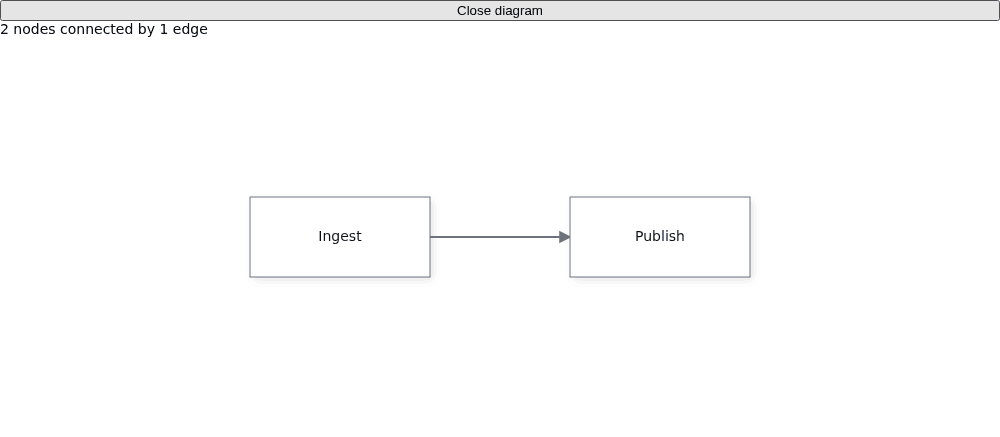
`fitView: true` frames the content on mount. The nodes render side by side with a line between them.
Pass data to `render()`: an object spec or its JSON string, not Mermaid text. To import text instead, see [Save and restore documents](https://bench-grafloria-61d.atloria.app/p/bench-grafloria-61d-mQCmWpDrxv/developer/save-and-restore-documents).
## 3. Keep the instance and clean up on close
The entry file keeps the returned instance in `api`, queries its live data for the status, and calls `dispose()` from the close handler before removing the editor.
`getModel()` returns the live [`DiagramModel`](https://bench-grafloria-61d.atloria.app/p/bench-grafloria-61d-mQCmWpDrxv/developer/grafloria-engine-models-diagrammodel), not a copy of your input specs. Use the instance for rendering operations such as `fitView()`; use `getEngine()` to reach the [`DiagramEngine`](https://bench-grafloria-61d.atloria.app/p/bench-grafloria-61d-mQCmWpDrxv/developer/grafloria-engine-engine) for commands, layout, and validation. See [Instance and lifecycle](https://bench-grafloria-61d.atloria.app/p/bench-grafloria-61d-mQCmWpDrxv/developer/instance-and-lifecycle) for the next instance operations.
On close, `dispose()` detaches interaction listeners, stops scheduled rendering, disconnects resize observation, and removes the diagram's DOM. In an application with route or component lifecycle hooks, put that call in the editor's unmount hook instead.
Start the development server from your project directory:
```bash
npx vite
```
Open the local URL Vite prints. You have a sized diagram containing Ingest and Publish, their connecting edge, a status showing the mounted model's counts, and a Close diagram button. Closing removes the editor and releases the instance.
## Where next
- Explore the [live JavaScript demos](https://grafloria.com/demos/) and their source tabs.
- Add HTML node content with [JavaScript elements and content](https://bench-grafloria-61d.atloria.app/p/bench-grafloria-61d-mQCmWpDrxv/developer/javascript-elements-and-content).
- Add editing actions with [Commands and history](https://bench-grafloria-61d.atloria.app/p/bench-grafloria-61d-mQCmWpDrxv/developer/commands-and-history).
- Learn the relationship between specs, models, and the engine in [How Grafloria works](https://bench-grafloria-61d.atloria.app/p/bench-grafloria-61d-mQCmWpDrxv/developer/how-grafloria-works).