# Export images and vector PDF
Use image export for downloads, reports and previews of a painted diagram. Exports render the scene graph, not a screenshot: the default includes the whole diagram, including content outside the camera. Use the separate static-render path for deterministic SVG on a server without a DOM.
Start from your framework's quick-start project: [JavaScript](https://bench-grafloria-61d.atloria.app/p/bench-grafloria-61d-mQCmWpDrxv/developer/javascript-quick-start), [Angular](https://bench-grafloria-61d.atloria.app/p/bench-grafloria-61d-mQCmWpDrxv/developer/angular-quick-start), [Qwik](https://bench-grafloria-61d.atloria.app/p/bench-grafloria-61d-mQCmWpDrxv/developer/qwik-quick-start), [React](https://bench-grafloria-61d.atloria.app/p/bench-grafloria-61d-mQCmWpDrxv/developer/react-quick-start) or [Vue](https://bench-grafloria-61d.atloria.app/p/bench-grafloria-61d-mQCmWpDrxv/developer/vue-quick-start). Keep its entry file, stylesheet imports and framework configuration. The examples below add an export view to that project; the entry file still mounts the app.
Skip installation when your framework's quick start already installed the packages.
JavaScript:
```bash
npm install @grafloria/element @grafloria/engine @grafloria/renderer
```
React:
```bash
npm install @grafloria/react @grafloria/element @grafloria/engine @grafloria/renderer
```
Vue:
```bash
npm install @grafloria/vue @grafloria/element @grafloria/engine @grafloria/renderer
```
Angular:
```bash
npm install @grafloria/angular @grafloria/element @grafloria/engine @grafloria/renderer
```
Qwik keeps these packages in devDependencies:
```bash
npm install -D @grafloria/qwik @grafloria/element @grafloria/engine @grafloria/renderer
```
## Export
### 1. Share the diagram and download helper
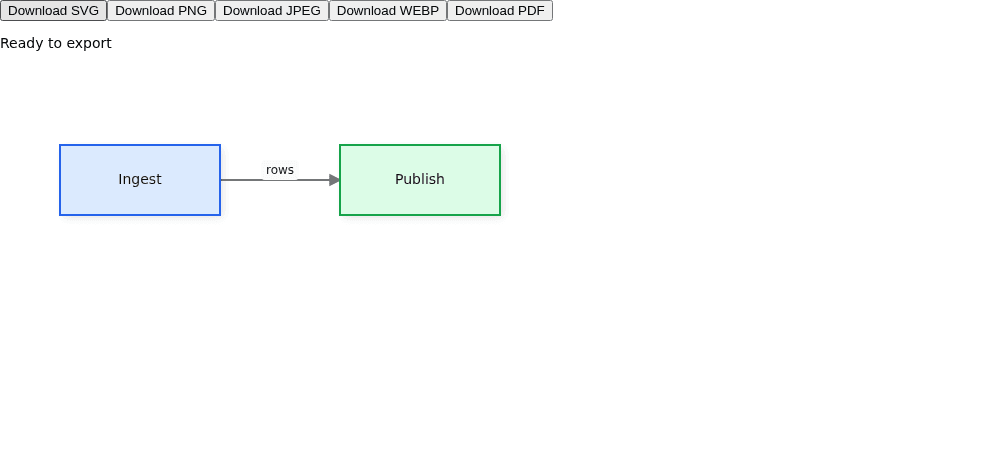
Create `src/export-data.ts` in your project. Typed [`NodeSpec`](https://bench-grafloria-61d.atloria.app/p/bench-grafloria-61d-mQCmWpDrxv/developer/grafloria-renderer-instance-nodespec) and [`EdgeSpec`](https://bench-grafloria-61d.atloria.app/p/bench-grafloria-61d-mQCmWpDrxv/developer/grafloria-renderer-instance-edgespec) data draw two connected boxes, with Ingest on the left and Publish on the right.
```ts title="src/export-data.ts"
import type { EdgeSpec, NodeSpec } from '@grafloria/renderer';
export const nodes: NodeSpec[] = [
{
id: 'ingest', label: 'Ingest',
position: { x: 60, y: 80 }, size: { width: 160, height: 70 },
style: { fill: '#dbeafe', stroke: '#2563eb', strokeWidth: 2 },
},
{
id: 'publish', label: 'Publish',
position: { x: 340, y: 80 }, size: { width: 160, height: 70 },
style: { fill: '#dcfce7', stroke: '#16a34a', strokeWidth: 2 },
},
];
export const edges: EdgeSpec[] = [
{ id: 'rows', source: 'ingest', target: 'publish', label: 'rows' },
];
```
Create `src/download.ts`. SVG comes back as source text; the other four formats come back as data URLs. This browser helper wraps only SVG and starts a download.
```ts title="src/download.ts"
import type { ExportFormat } from '@grafloria/renderer';
export function download(format: ExportFormat, value: string): void {
const anchor = document.createElement('a');
anchor.href = format === 'svg'
? `data:image/svg+xml;charset=utf-8,${encodeURIComponent(value)}`
: value;
anchor.download = `diagram.${format}`;
anchor.click();
}
export function downloadPdf(bytes: Uint8Array): void {
const url = URL.createObjectURL(new Blob([new Uint8Array(bytes)], { type: 'application/pdf' }));
const anchor = document.createElement('a');
anchor.href = url;
anchor.download = 'diagram.pdf';
anchor.click();
setTimeout(() => URL.revokeObjectURL(url), 1000);
}
```
[`ExportFormat`](https://bench-grafloria-61d.atloria.app/p/bench-grafloria-61d-mQCmWpDrxv/developer/grafloria-renderer-types-types#exportformat) has five values:
| Value | Return from async export | Result |
| --- | --- | --- |
| `svg` | SVG source string | Vector shapes and text, with styles inlined. |
| `png` | `data:image/png` URL | Raster image with transparency support. |
| `jpeg` | `data:image/jpeg` URL | Lossy raster; the exporter supplies white behind transparent areas unless you choose a background. |
| `webp` | `data:image/webp` URL | Raster image with configurable quality. |
| `pdf` | `data:application/pdf` URL | Vector PDF: paths remain paths and labels remain selectable text. |
### 2. Mount the export view
Keep a live [`DiagramInstance`](https://bench-grafloria-61d.atloria.app/p/bench-grafloria-61d-mQCmWpDrxv/developer/grafloria-renderer-instance-diagraminstance) and call `export()` from a button after the diagram appears. Angular exposes the same pipeline as `exportDiagram()` on [`DiagramCanvasComponent`](https://bench-grafloria-61d.atloria.app/p/bench-grafloria-61d-mQCmWpDrxv/developer/grafloria-angular-components-diagramcanvascomponent).
The JavaScript view uses [`render`](https://bench-grafloria-61d.atloria.app/p/bench-grafloria-61d-mQCmWpDrxv/developer/grafloria-element-core#render). The React, Vue and Qwik views use their respective [`GrafloriaFlow`](https://bench-grafloria-61d.atloria.app/p/bench-grafloria-61d-mQCmWpDrxv/developer/grafloria-react#grafloriaflow), [`GrafloriaFlow`](https://bench-grafloria-61d.atloria.app/p/bench-grafloria-61d-mQCmWpDrxv/developer/grafloria-vue#grafloriaflow) and [`GrafloriaFlow`](https://bench-grafloria-61d.atloria.app/p/bench-grafloria-61d-mQCmWpDrxv/developer/grafloria-qwik#grafloriaflow) components. Each canvas has a resolved height of 400 pixels.
Use the tab for your framework. For JavaScript, change `src/main.ts` as shown, keeping the starter's stylesheet import. For React and Vue, add the component file and render it from your existing `App` component. For Angular, add the standalone component to your existing root component's `imports` and template as ``. For Qwik, create `src/ExportExample.tsx` and re-export its default component from `src/routes/index.tsx` with `export { default } from '../ExportExample';`.
:::code-group
```ts title="JavaScript"
// src/main.ts
import './style.css';
import { render } from '@grafloria/element';
import type { ExportFormat } from '@grafloria/renderer';
import { nodes, edges } from './export-data';
import { download } from './download';
const app = document.querySelector('#app');
if (!app) throw new Error('Missing #app');
app.innerHTML = '
;
});
```
:::
The Angular two-way arrays can contain specs or live [`NodeModel`](https://bench-grafloria-61d.atloria.app/p/bench-grafloria-61d-mQCmWpDrxv/developer/grafloria-engine-models-nodemodel) and [`LinkModel`](https://bench-grafloria-61d.atloria.app/p/bench-grafloria-61d-mQCmWpDrxv/developer/grafloria-engine-models-linkmodel) values, matching the component's output types. The bindings own instance teardown when their components unmount. In a JavaScript view with a mount/unmount lifecycle, call `instance.dispose()` in that view's unmount handler, not after mounting it.
The Angular SVG button calls `exportSvg()` synchronously and downloads `result.svg`, displaying any `result.warnings`. This captures custom nodes as they stand without fetching external images; use `exportDiagram('svg')` when those images need embedding.
### 3. Download and inspect
Run your project's development command. The view shows two colored nodes, the `rows` edge label and five download buttons. Click Download PNG to get a raster at twice the intrinsic scale, subject to the output-size cap. Click Download SVG to inspect vector markup. Click Download PDF and select the labels in your PDF reader: they are text, not pixels. The PDF uses a 24-point page margin and a document title of “Ingest to publish”.
The Vue view presents the same diagram and controls.
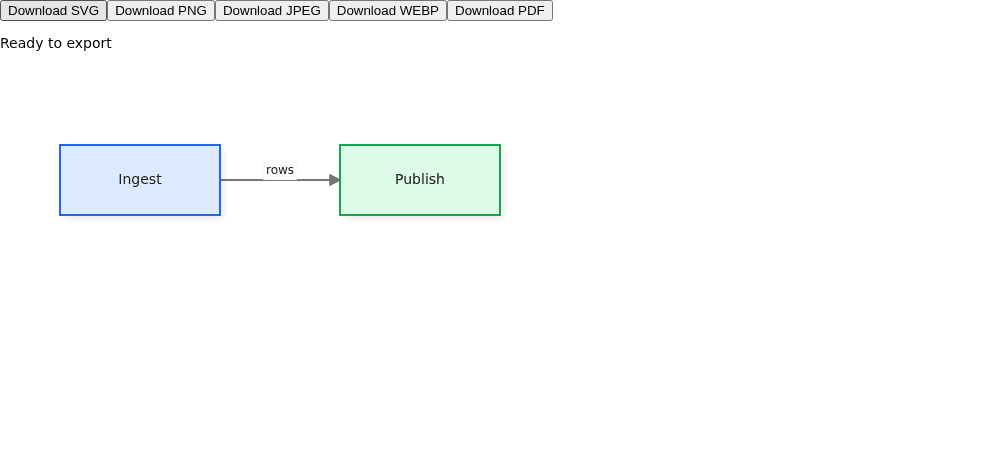
Move a node and download again to export the current model. No redraw or fit call is needed for the download. Compare the task with the live [Download image demo](https://grafloria.com/demos/misc/download-image.html) and [PDF export demo](https://grafloria.com/demos/misc/pdf-export.html).
## Capture custom content and assets
Prefer async `export()` when the diagram contains framework-rendered custom nodes or external images. The instance captures its HTML hosts automatically, waits for the promises returned by async painters, then resolves image assets. It first tries the environment's fetch and then your `assetFetcher` if provided. Use `onWarnings` to surface partial captures and unresolved URLs beside the download control, as the export view does.
When you already have content from a separate painter, pass [`CustomNodeCapture`](https://bench-grafloria-61d.atloria.app/p/bench-grafloria-61d-mQCmWpDrxv/developer/grafloria-renderer-export-interfaces#customnodecapture) data through `customNodes`. The following additional browser example mounts a node whose interior is supplied as a vector display list. Use this as an alternative `src/main.ts` in your JavaScript project, keeping its stylesheet import. The entry file calls the mount function on `#app`.
```ts title="src/main.ts"
import './style.css';
import { render } from '@grafloria/element';
import type { CustomNodeCapture, NodeSpec } from '@grafloria/renderer';
import { download, downloadPdf } from './download';
function mountCaptureExample(host: HTMLElement): () => void {
const toolbar = document.createElement('div');
const canvas = document.createElement('div');
canvas.style.height = '400px';
host.append(toolbar, canvas);
const nodes: NodeSpec[] = [{
id: 'chart', custom: true,
position: { x: 60, y: 60 }, size: { width: 180, height: 100 },
}];
const customNodes: CustomNodeCapture[] = [{
id: 'chart', rect: { x: 60, y: 60, width: 180, height: 100 }, fidelity: 'vector',
content: [
{ type: 'rect', props: { x: 0, y: 0, width: 180, height: 100, fill: '#dbeafe' } },
{ type: 'rect', props: { x: 20, y: 40, width: 30, height: 40, fill: '#2563eb' } },
{ type: 'rect', props: { x: 65, y: 20, width: 30, height: 60, fill: '#16a34a' } },
],
}];
const instance = render({ nodes }, canvas, {
renderCustomNode: (_node, element) => {
element.innerHTML = '';
},
});
const status = document.createElement('span');
const svgButton = document.createElement('button');
svgButton.textContent = 'Download captured SVG';
svgButton.onclick = () => {
const result = instance.exportSvgString({
customNodes, viewport: { x: 40, y: 40, width: 220, height: 140 },
});
download('svg', result.svg);
status.textContent = result.warnings.join('; ') || 'Captured SVG downloaded';
};
const pdfButton = document.createElement('button');
pdfButton.textContent = 'Download captured PDF';
pdfButton.onclick = () => {
const result = instance.exportPdf({ customNodes, pdf: { margin: 24 } });
downloadPdf(result.pdf);
status.textContent = result.warnings.join('; ') || 'Captured PDF downloaded';
};
toolbar.append(svgButton, pdfButton, status);
return () => { instance.dispose(); toolbar.remove(); canvas.remove(); };
}
const host = document.querySelector('#app');
if (!host) throw new Error('Missing #app');
host.replaceChildren();
mountCaptureExample(host);
```
The mounted view and both exports show a blue and a green bar on a pale-blue rectangle. The SVG uses the explicit world-space `viewport` rectangle; the PDF fits the captured content. `exportSvgString()` returns SVG, dimensions, a view box and warnings synchronously. `exportPdf()` returns PDF bytes, page count and warnings synchronously. Neither waits for unfinished painters or fetches external images; use `resolvedAssets` when a synchronous export needs image bytes you already hold.
For automatic framework custom-node rendering, use the binding patterns in [Customize rendering contracts](https://bench-grafloria-61d.atloria.app/p/bench-grafloria-61d-mQCmWpDrxv/developer/custom-rendering), rather than maintaining a parallel capture list.
## Render deterministic SVG on a server
Use [`renderStatic`](https://bench-grafloria-61d.atloria.app/p/bench-grafloria-61d-mQCmWpDrxv/developer/grafloria-element-core#renderstatic) from the element package, or [`renderToStaticSVG`](https://bench-grafloria-61d.atloria.app/p/bench-grafloria-61d-mQCmWpDrxv/developer/grafloria-renderer-core#rendertostaticsvg) from the renderer package. Both return the same static result. No mounted browser instance is involved in this path.
In a Node project, install the packages and a TypeScript runner:
```bash
npm install @grafloria/element @grafloria/engine @grafloria/renderer
npm install --save-dev tsx @types/node
```
Copy `export-data.ts` from the first step alongside `export-static.ts`. This script creates a standalone file, inserts the returned stylesheet into it, and checks two independent renders for identical output. The file's Node type reference makes `node:fs` available even when the starter's TypeScript configuration limits ambient types; keep the browser configuration unchanged.
```ts title="export-static.ts"
///
import { writeFileSync } from 'node:fs';
import { renderStatic } from '@grafloria/element';
import { renderToStaticSVG } from '@grafloria/renderer';
import type { StaticRenderOptions, StaticRenderResult } from '@grafloria/renderer';
import { nodes, edges } from './export-data';
const options: StaticRenderOptions = {
nodes, edges, width: 520, height: 300, standalone: true,
};
function artifact(result: StaticRenderResult): string {
return result.svg.replace(/^(]*>)/, `$1`);
}
const first = artifact(renderStatic(options));
const second = artifact(renderToStaticSVG(options));
if (first !== second) throw new Error('Static renders differ');
writeFileSync('diagram.svg', first, 'utf8');
console.log('Wrote diagram.svg; independent renders match.');
```
```bash
npx tsx export-static.ts
```
Open `diagram.svg`: it contains the same Ingest and Publish boxes and connecting edge. [`StaticRenderResult`](https://bench-grafloria-61d.atloria.app/p/bench-grafloria-61d-mQCmWpDrxv/developer/grafloria-renderer-core#staticrenderresult) separates `svg`, `css`, the full layer `html` and the hydration `snapshot`. Include `css` when publishing static markup; `standalone: true` adds the SVG namespace, not theme inlining. Keep the snapshot with the same specs for interactive hydration; see [Instance and lifecycle](https://bench-grafloria-61d.atloria.app/p/bench-grafloria-61d-mQCmWpDrxv/developer/instance-and-lifecycle).
Static rendering includes SVG nodes, ports, edges, labels and group frames. It does not render framework HTML-layer custom components; those mount on hydration. The live [Server-side export demo](https://grafloria.com/demos/misc/server-side-export.html) demonstrates the same spec-to-SVG path and byte comparison.
## Export a renderer-owned scene tree
Use the instance methods for application downloads. The lower-level [`exportSvg`](https://bench-grafloria-61d.atloria.app/p/bench-grafloria-61d-mQCmWpDrxv/developer/grafloria-renderer-export-functions-b-s#exportsvg) and [`exportPdf`](https://bench-grafloria-61d.atloria.app/p/bench-grafloria-61d-mQCmWpDrxv/developer/grafloria-renderer-export-pdf#exportpdf) functions are for code that already owns a rendered [`VNode`](https://bench-grafloria-61d.atloria.app/p/bench-grafloria-61d-mQCmWpDrxv/developer/grafloria-renderer-types-interfaces-s-v#vnode) tree. They do not capture DOM hosts or fetch assets.
This browser entry file uses [`SVGRenderer`](https://bench-grafloria-61d.atloria.app/p/bench-grafloria-61d-mQCmWpDrxv/developer/grafloria-renderer-svg-svgrenderer) to render the model of a real mounted diagram. It then passes that exact tree to both serializers. Use it as another alternative `src/main.ts`; it mounts into `#app` and keeps the starter's stylesheet import. This goes below the instance only to show the tree-to-file boundary; keep the instance pipeline for custom HTML content.
```ts title="src/main.ts"
import './style.css';
import { render } from '@grafloria/element';
import { SVGRenderer, exportSvg, exportPdf } from '@grafloria/renderer';
import { nodes, edges } from './export-data';
import { download, downloadPdf } from './download';
function mountTreeExport(host: HTMLElement): () => void {
const canvas = document.createElement('div');
canvas.style.height = '400px';
const button = document.createElement('button');
button.textContent = 'Download scene SVG and PDF';
const note = document.createElement('p');
host.append(button, note, canvas);
const instance = render({ nodes, edges }, canvas);
button.onclick = () => {
const renderer = new SVGRenderer(instance.getEngine());
try {
const tree = renderer.render({ x: 0, y: 0, width: 520, height: 300 }, 1);
const svg = exportSvg(tree, { padding: 32 });
const pdf = exportPdf(tree, { margin: 24, metadata: { title: 'Scene export' } });
download('svg', svg.svg);
downloadPdf(pdf.pdf);
note.textContent = [...svg.warnings, ...pdf.warnings].join('; ') || 'Scene files downloaded';
} finally {
renderer.dispose();
}
};
return () => { instance.dispose(); canvas.remove(); button.remove(); note.remove(); };
}
const host = document.querySelector('#app');
if (!host) throw new Error('Missing #app');
host.replaceChildren();
mountTreeExport(host);
```
For a non-default theme, pass the same theme to the renderer and serializers so CSS-mode paint resolves consistently. Disposing this temporary serializer renderer does not dispose the mounted diagram's instance.
## Options that matter
### Image and capture options
Pass [`ExportOptions`](https://bench-grafloria-61d.atloria.app/p/bench-grafloria-61d-mQCmWpDrxv/developer/grafloria-renderer-types-exportoptions) to the instance's async or synchronous export methods.
| Option | Type | Default | What it does |
| --- | --- | --- | --- |
| `padding` | `number` | `20` | Adds world-space margin around content; ignored with an explicit `viewport`. |
| `viewport` | [`Rectangle`](https://bench-grafloria-61d.atloria.app/p/bench-grafloria-61d-mQCmWpDrxv/developer/grafloria-renderer-types-interfaces-b-s#rectangle) | Content bounds | Chooses an exact world-space rectangle. |
| `scope` | [`ExportScope`](https://bench-grafloria-61d.atloria.app/p/bench-grafloria-61d-mQCmWpDrxv/developer/grafloria-renderer-export-types#exportscope) | `content` | Chooses whole content, a viewport slice or live selection. |
| `scale` | `number` | `1` | Multiplies intrinsic image dimensions, not the world-space view box. |
| `backgroundColor` | `string` | Transparent | Paints behind the content; JPEG supplies white if omitted. |
| `quality` | `number` | `0.92` | Sets JPEG/WebP quality from 0 to 1. |
| `maxSize` | `number` | `4000` on the raster path | Reduces scale to keep each side within the cap, without cropping. SVG accepts an explicit cap. |
| `minSize` | `number` | `1` | Sets the minimum intrinsic dimension per side. |
| `xmlDeclaration` | `boolean` | `false` | Adds an XML prolog to SVG. |
| `foreignObject` | [`ForeignObjectMode`](https://bench-grafloria-61d.atloria.app/p/bench-grafloria-61d-mQCmWpDrxv/developer/grafloria-renderer-export-types#foreignobjectmode) | `serialize` | Controls HTML-in-SVG serialization. |
| `customNodes` | Readonly capture array | Captured by the instance | Overrides HTML-host captures; `[]` excludes widgets. |
| `htmlFallback` | [`HtmlFallbackMode`](https://bench-grafloria-61d.atloria.app/p/bench-grafloria-61d-mQCmWpDrxv/developer/grafloria-renderer-export-types#htmlfallbackmode) | `foreignObject` | Chooses how HTML-only custom captures appear. |
| `customNodeTimeout` | `number` | `5000` ms | Bounds async-painter waiting; `0` captures immediately and reports unfinished painters. |
| `assetFetcher` | [`AssetFetcher`](https://bench-grafloria-61d.atloria.app/p/bench-grafloria-61d-mQCmWpDrxv/developer/grafloria-renderer-export-types#assetfetcher) | None | Supplies a second fetch tier after the environment's fetch fails. |
| `resolvedAssets` | `ReadonlyMap` | None | Maps external URLs to pre-resolved data URIs; matched URLs are not fetched again. |
| `assetTimeout` | `number` | `5000` ms per image per tier | Bounds external-image fetching. |
| `assetMaxBytes` | `number` | 5 MB | Refuses oversized fetched images with a warning. |
| `embedFontCss` | `string` | None | Inserts font CSS into SVG definitions; use embedded data-URI sources. |
| `embedFonts` | [`FontSource`](https://bench-grafloria-61d.atloria.app/p/bench-grafloria-61d-mQCmWpDrxv/developer/grafloria-renderer-export-interfaces#fontsource) array | None | Builds embedded `@font-face` rules from supplied font bytes. |
| `rasterBackend` | [`RasterBackend`](https://bench-grafloria-61d.atloria.app/p/bench-grafloria-61d-mQCmWpDrxv/developer/grafloria-renderer-export-interfaces#rasterbackend) | Browser canvas backend | Supplies the SVG-to-pixels engine for raster formats. |
| `pdf` | [`PdfExportOptions`](https://bench-grafloria-61d.atloria.app/p/bench-grafloria-61d-mQCmWpDrxv/developer/grafloria-renderer-export-pdf#pdfexportoptions) | One page, 36-point margins | Sets PDF paper, margins and metadata. |
The scope values are `content` (all drawn content), `viewport` (a world-space slice) and `selection` (only currently selected nodes and links). Supply an explicit `viewport` rectangle whenever you want a fixed slice, as the capture example does. SVG and raster exports reject `scope: 'viewport'` without a rectangle; PDF uses content bounds when the rectangle is omitted.
`foreignObject` accepts `serialize` (keep HTML), `placeholder` (replace it with a marked box) and `omit` (leave it out). `htmlFallback` accepts `foreignObject` (carry HTML in SVG), `placeholder` and `omit`. A custom capture's fidelity is `vector` (SVG primitives usable in PDF), `html` (HTML-only, reported as a fidelity risk) or `empty` (a marked box and warning).
### Static-render options
[`StaticRenderOptions`](https://bench-grafloria-61d.atloria.app/p/bench-grafloria-61d-mQCmWpDrxv/developer/grafloria-renderer-core#staticrenderoptions) describes the server canvas and camera, rather than an export crop.
| Option | Type | Default | What it does |
| --- | --- | --- | --- |
| `nodes`, `edges` | Spec arrays | Empty | Supply the scene data. |
| `groups` | [`GroupSpec`](https://bench-grafloria-61d.atloria.app/p/bench-grafloria-61d-mQCmWpDrxv/developer/grafloria-renderer-instance-interfaces#groupspec) array | None | Adds group and lane frames after their children. |
| `theme` | [`Theme`](https://bench-grafloria-61d.atloria.app/p/bench-grafloria-61d-mQCmWpDrxv/developer/grafloria-renderer-types-interfaces-s-v#theme) | Built-in light theme | Supplies the returned stylesheet. |
| `width`, `height` | `number` | `800`, `600` CSS px | Set canvas dimensions and standalone SVG dimensions. |
| `zoom` | `number` | `1` | Sets camera scale. |
| `viewport` | `{ x: number; y: number }` | `{ x: 0, y: 0 }` | Sets camera origin in world coordinates. |
| `instanceId` | `string` | `grafloria-ssr` | Sets CSS scope; use a distinct id for each diagram on one page. |
| `fitView` | `boolean` | `false` | Frames content instead of using the supplied camera. |
| `fitPadding` | `number` | `40` CSS px | Sets padding for static fit-to-content. |
| `standalone` | `boolean` | `false` | Adds `xmlns` for a standalone SVG file. |
## Pitfalls and environment boundaries
- Export after the canvas has painted. Use a user-facing button after mounting, rather than an immediate export during initialization.
- Async export waits for painter promises, not arbitrary later UI updates. A timeout exports the content available so far and reports a warning. Synchronous exports cannot wait or fetch.
- HTML carried in `foreignObject` works in browser SVG, but PDF cannot represent it. Prefer vector captures for cross-format fidelity. PDF also omits Gaussian-blurred shadows; inspect warnings rather than assuming every SVG effect survives.
- Font embedding applies to the SVG pipeline; the vector PDF writer uses its base-font text pipeline. Do not expect `embedFonts` to embed fonts in PDF.
- A server-side image proxy needs an allowlist and protection against requests into private networks. Do not turn `assetFetcher` into an unrestricted URL proxy.
- Node needs a raster engine for PNG/JPEG/WebP. Use the shipped `createResvgBackend` for PNG or `createSharpBackend` for all three raster formats, supplying the corresponding installed module. SVG static rendering needs neither.
[`isBrowser`](https://bench-grafloria-61d.atloria.app/p/bench-grafloria-61d-mQCmWpDrxv/developer/grafloria-renderer-core#isbrowser) tests for both `window` and `document`; [`now`](https://bench-grafloria-61d.atloria.app/p/bench-grafloria-61d-mQCmWpDrxv/developer/grafloria-renderer-core#now) supplies a clock even without `performance`. Neither is needed for deterministic static rendering. [`printDocument`](https://bench-grafloria-61d.atloria.app/p/bench-grafloria-61d-mQCmWpDrxv/developer/grafloria-renderer-export-functions-b-s#printdocument) opens the browser print dialog through a hidden iframe for an already-built print document; it is browser-only, not a Node PDF renderer.
These image downloads do not include an editable document. For the authors' `embedModel` flow—SVG or PNG carrying the full integrity-checked document, loaded through `importDiagram`—use [Save and restore documents](https://bench-grafloria-61d.atloria.app/p/bench-grafloria-61d-mQCmWpDrxv/developer/save-and-restore). That page covers reopening and protecting newer edits; JPEG and WebP do not carry the embedded document.
## Related
- [Theme a diagram](https://bench-grafloria-61d.atloria.app/p/bench-grafloria-61d-mQCmWpDrxv/developer/theme-diagram) — control the theme the exporter resolves into file styles.
- [Customize rendering contracts](https://bench-grafloria-61d.atloria.app/p/bench-grafloria-61d-mQCmWpDrxv/developer/custom-rendering) — render HTML hosts that the async exporter captures.
- [Save and restore documents](https://bench-grafloria-61d.atloria.app/p/bench-grafloria-61d-mQCmWpDrxv/developer/save-and-restore) — preserve editable data rather than only the picture.