# Draw and edit ink
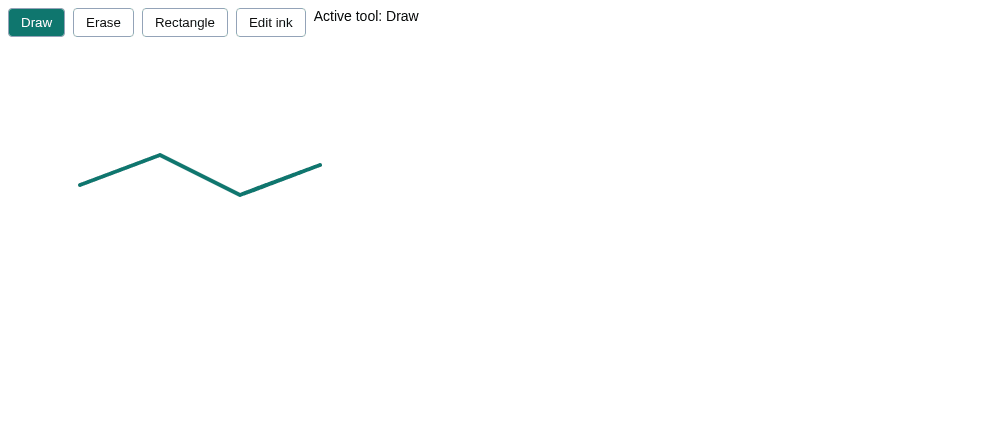
Use the shipped whiteboard tools to annotate a mounted diagram with vector ink. The example starts with a teal stroke and four toolbar buttons: draw more ink, erase whole strokes, drag out rectangle nodes, or move committed ink.
Ink belongs to the live document, not to the framework's node array. Freehand marks are [`StrokeModel`](https://bench-grafloria-61d.atloria.app/p/bench-grafloria-61d-mQCmWpDrxv/developer/grafloria-engine-models-strokemodel#strokemodel) entities; rectangles are nodes. The tools use the canvas's existing pointer and touch gesture pipeline.
## 1. Install the packages
Run the common install command in your application, then add your framework binding if you use one.
```bash
npm install @grafloria/renderer @grafloria/engine
```
JavaScript:
```bash
npm install @grafloria/element
```
Angular:
```bash
npm install @grafloria/angular @grafloria/element @angular/common @angular/core @angular/forms @angular/platform-browser rxjs
```
Qwik:
```bash
npm install @grafloria/qwik @builder.io/qwik
```
React:
```bash
npm install @grafloria/react react react-dom
```
Vue:
```bash
npm install @grafloria/vue vue
```
## 2. Attach the tools and toolbar
Create `ink-tools.ts` in your browser application's source directory. The next step imports it from each framework's mounted canvas.
[`createDrawTool`](https://bench-grafloria-61d.atloria.app/p/bench-grafloria-61d-mQCmWpDrxv/developer/grafloria-renderer-interaction-functions#createdrawtool), [`createEraserTool`](https://bench-grafloria-61d.atloria.app/p/bench-grafloria-61d-mQCmWpDrxv/developer/grafloria-renderer-interaction-functions#createerasertool), [`createRectangleTool`](https://bench-grafloria-61d.atloria.app/p/bench-grafloria-61d-mQCmWpDrxv/developer/grafloria-renderer-interaction-functions#createrectangletool) and [`createStrokeEditTool`](https://bench-grafloria-61d.atloria.app/p/bench-grafloria-61d-mQCmWpDrxv/developer/grafloria-renderer-interaction-functions#createstrokeedittool) return live tools. Attach each with [`registerTool`](https://bench-grafloria-61d.atloria.app/p/bench-grafloria-61d-mQCmWpDrxv/developer/grafloria-renderer-ext-functions#registertool), and use `setActive()` to switch modes. Each registration returns a cleanup function.
The factories take a [`WhiteboardHost`](https://bench-grafloria-61d.atloria.app/p/bench-grafloria-61d-mQCmWpDrxv/developer/grafloria-renderer-interaction-interfaces-v-w#whiteboardhost): the mounted model, viewport, container and repaint hook, plus the engine for history. A [`DiagramInstance`](https://bench-grafloria-61d.atloria.app/p/bench-grafloria-61d-mQCmWpDrxv/developer/grafloria-renderer-instance-diagraminstance#diagraminstance) already supplies these members. Angular supplies the same members through its canvas component.
This helper seeds real ink, registers the shipped tools, and creates the toolbar. It keeps exactly one tool active, including disabling stroke editing in eraser mode.
```ts title="ink-tools.ts"
import { StrokeModel } from '@grafloria/engine';
import {
createDrawTool,
createEraserTool,
createRectangleTool,
createStrokeEditTool,
registerTool,
type WhiteboardHost,
} from '@grafloria/renderer';
export function attachInkTools(host: WhiteboardHost, toolbar: HTMLElement): () => void {
host.getModel().addStroke(new StrokeModel(
[
{ x: 80, y: 140 }, { x: 160, y: 110 },
{ x: 240, y: 150 }, { x: 320, y: 120 },
],
{ color: '#0f766e', width: 4 },
{ id: 'ink-seed', label: 'Example annotation' },
));
const draw = createDrawTool(host, {
color: '#0f766e', width: 4, simplifyEpsilon: 0.8,
});
const eraser = createEraserTool(host, { radius: 10, active: false });
const rectangle = createRectangleTool(host, {
fill: '#dbeafe', stroke: '#2563eb', strokeWidth: 2,
label: 'Box', active: false,
});
const edit = createStrokeEditTool(host, { tolerance: 6, active: false });
const tools = [draw, eraser, rectangle, edit];
const unregister = tools.map(tool => registerTool(tool));
const abort = new AbortController();
const buttons: HTMLButtonElement[] = [];
const names = ['Draw', 'Erase', 'Rectangle', 'Edit ink'];
const status = document.createElement('output');
status.setAttribute('aria-live', 'polite');
toolbar.style.cssText = 'display:flex;gap:8px;padding:8px;font:14px sans-serif';
function activate(index: number): void {
tools.forEach((tool, i) => tool.setActive(i === index));
status.textContent = `Active tool: ${names[index]}`;
buttons.forEach((button, i) => {
button.setAttribute('aria-pressed', String(i === index));
button.style.background = i === index ? '#0f766e' : '#fff';
button.style.color = i === index ? '#fff' : '#111';
});
}
names.forEach((name, index) => {
const button = document.createElement('button');
button.type = 'button';
button.textContent = name;
button.style.cssText = 'padding:6px 12px;border:1px solid #94a3b8;border-radius:4px';
button.addEventListener('pointerdown', () => activate(index), { signal: abort.signal });
button.addEventListener('click', () => activate(index), { signal: abort.signal });
buttons.push(button);
toolbar.append(button);
});
toolbar.append(status);
activate(0);
host.render();
return () => {
abort.abort();
for (const off of unregister.reverse()) off();
for (const button of buttons) button.remove();
status.remove();
};
}
```
## 3. Mount a canvas in your framework
Each tab renders the same initial annotation in a 400-pixel-high canvas. Keep `ink-tools.ts` beside the file below. The framework owns the diagram's lifetime; its unmount hook removes the tool registrations.
Pass the JavaScript [`render`](https://bench-grafloria-61d.atloria.app/p/bench-grafloria-61d-mQCmWpDrxv/developer/grafloria-element-core#render) instance to `attachInkTools()`, or adapt Angular's [`DiagramCanvasComponent`](https://bench-grafloria-61d.atloria.app/p/bench-grafloria-61d-mQCmWpDrxv/developer/grafloria-angular-components-diagramcanvascomponent#diagramcanvascomponent) to `WhiteboardHost` as below; see [Edit nodes](https://bench-grafloria-61d.atloria.app/p/bench-grafloria-61d-mQCmWpDrxv/developer/edit-nodes) for canvas setup and typed node/edge bindings.
Connect `attachInkTools()` to React's [`GrafloriaFlow`](https://bench-grafloria-61d.atloria.app/p/bench-grafloria-61d-mQCmWpDrxv/developer/grafloria-react), Vue's [`GrafloriaFlow`](https://bench-grafloria-61d.atloria.app/p/bench-grafloria-61d-mQCmWpDrxv/developer/grafloria-vue), or Qwik's [`GrafloriaFlow`](https://bench-grafloria-61d.atloria.app/p/bench-grafloria-61d-mQCmWpDrxv/developer/grafloria-qwik) as below; see [Documents and kits](https://bench-grafloria-61d.atloria.app/p/bench-grafloria-61d-mQCmWpDrxv/developer/documents-and-kits) for instance initialization and Qwik's browser-only setup.
:::code-group
```ts title="JavaScript"
// main.ts — your HTML contains .
import { render } from '@grafloria/element';
import { attachInkTools } from './ink-tools';
export function mountInkBoard(target: HTMLElement): () => void {
const toolbar = document.createElement('div');
const canvas = document.createElement('div');
canvas.style.cssText = 'height:400px;position:relative;touch-action:none';
target.append(toolbar, canvas);
const instance = render({ nodes: [], edges: [] }, canvas);
const removeTools = attachInkTools(instance, toolbar);
return () => {
removeTools();
instance.dispose();
toolbar.remove();
canvas.remove();
};
}
const target = document.getElementById('app');
if (!target) throw new Error('Missing #app');
export const unmountInkBoard = mountInkBoard(target);
```
```ts title="Angular"
// ink-board.component.ts
import { AfterViewInit, Component, ElementRef, OnDestroy, viewChild } from '@angular/core';
import { DiagramCanvasComponent } from '@grafloria/angular';
import type { NodeInput, EdgeInput, WhiteboardHost } from '@grafloria/renderer';
import { attachInkTools } from './ink-tools';
@Component({
selector: 'app-ink-board',
standalone: true,
imports: [DiagramCanvasComponent],
template: `
`,
})
export class InkBoardComponent implements AfterViewInit, OnDestroy {
readonly canvas = viewChild.required(DiagramCanvasComponent);
readonly host = viewChild.required>('host');
readonly toolbar = viewChild.required>('toolbar');
nodes: NodeInput[] = [];
edges: EdgeInput[] = [];
private removeTools?: () => void;
ngAfterViewInit(): void {
const canvas = this.canvas();
const engine = canvas.activeEngine();
const model = engine?.getDiagram();
const viewport = canvas.viewportController();
if (!engine || !model || !viewport) throw new Error('Canvas not initialized');
const host: WhiteboardHost = {
getModel: () => model,
getEngine: () => engine,
viewport,
container: this.host().nativeElement,
render: () => canvas.scheduleRender(),
};
this.removeTools = attachInkTools(host, this.toolbar().nativeElement);
}
ngOnDestroy(): void {
this.removeTools?.();
}
}
```
```tsx title="Qwik"
// ink-board.tsx
import { $, component$, noSerialize, useSignal, useVisibleTask$, type NoSerialize } from '@builder.io/qwik';
import { GrafloriaFlow, type DiagramInstance } from '@grafloria/qwik';
import { attachInkTools } from './ink-tools';
export default component$(() => {
const toolbar = useSignal();
const instance = useSignal>();
useVisibleTask$(({ track, cleanup }) => {
const mounted = track(() => instance.value);
const controls = track(() => toolbar.value);
if (!mounted || !controls) return;
cleanup(attachInkTools(mounted, controls));
});
return
{
instance.value = noSerialize(mounted);
})} />
;
});
```
```tsx title="React"
// ink-board.tsx
import { useEffect, useRef } from 'react';
import { GrafloriaFlow, type DiagramInstance } from '@grafloria/react';
import { attachInkTools } from './ink-tools';
export default function InkBoard() {
const toolbar = useRef(null);
const removeTools = useRef<(() => void) | undefined>(undefined);
useEffect(() => () => { removeTools.current?.(); }, []);
function onInit(instance: DiagramInstance): void {
if (!toolbar.current) throw new Error('Missing toolbar');
removeTools.current = attachInkTools(instance, toolbar.current);
}
return ;
}
```
```vue title="Vue"
```
:::
The JavaScript sample starts with Draw selected above a teal annotation.
Call the JavaScript tab's exported `unmountInkBoard()` when your application removes that view. The framework tabs leave instance disposal to their binding.
### Try the gestures
Click a mode button and look for `Active tool: ` beside the buttons, where `` is the selected tool's name. The status text changes in the same handler that activates the tool.
1. With Draw active, press and drag in the canvas, then release. The growing preview becomes one simplified vector stroke in the live model.
2. Click Edit ink, press on the seeded stroke, and drag. A ghost follows the pointer; release moves the whole stroke. Escape cancels the move without changing the document.
3. Click Erase and sweep across ink. Release removes every stroke the sweep crosses, including the entire stroke rather than a pixel-wide gap. Nodes remain untouched.
4. Click Rectangle and drag corner to corner. Release creates a node labelled Box, positioned and sized by the drag. Either drag direction works; a drag smaller than `minSize` in either dimension creates nothing.
Drawing, erasing and translating ink each commit one command when the host supplies `getEngine()`. For history controls, see [Commands and history](https://bench-grafloria-61d.atloria.app/p/bench-grafloria-61d-mQCmWpDrxv/developer/commands-and-history).
> **Known issue:** The rectangle tool adds its node directly to the model, so rectangle creation does not join the engine's undo stack. Use the shipped tool for drawing boxes; if your application requires undoable creation, add a node through `getEngine().addNode()` from your own creation control, as shown in [Edit nodes](https://bench-grafloria-61d.atloria.app/p/bench-grafloria-61d-mQCmWpDrxv/developer/edit-nodes).
## Options that matter
Pass these options to the corresponding factory. Sizes and hit tolerances are in world coordinates, so zoom changes their apparent screen size.
| Option | Type | Default | What it does |
| --- | --- | --- | --- |
| Draw `color` | `string` | `'#1f2933'` | Sets ink and preview color. |
| Draw `width` | `number` | `3` | Sets ink width. |
| Draw `simplifyEpsilon` | `number` | Model's simplification default | Sets Douglas–Peucker tolerance at commit. |
| Draw `label` | `string` | Omitted | Names each committed stroke for accessibility. |
| Eraser `radius` | `number` | `8` | Adds a hit radius around the swept path. |
| Rectangle `minSize` | `number` | `4` | Rejects drags whose width or height is smaller. |
| Rectangle `label` | `string` | Omitted | Labels the created node. |
| Edit `tolerance` | `number` | `6` | Adds a hit radius around committed ink. |
| Edit `highlightColor` | `string` | `'#2563eb'` | Colors the selected stroke's highlight. |
| All tools `active` | `boolean` | `true` | Enables gesture claims; change it later with `setActive()`. |
Anonymous ink is hidden from the accessibility tree. A stroke with a `label`, such as the seeded annotation, is exposed as an image with that accessible name.
## Tool ownership and pitfalls
- Keep at most one of draw, eraser and rectangle active. They claim every press while active, including presses over nodes. Select Edit ink to let the built-in node and empty-canvas interactions run wherever there is no ink.
- If you keep stroke editing active alongside drawing, a press on ink edits instead of drawing over it: the ink-specific tool has higher priority. Disable editing when you want the eraser to consume ink. The example's mode switch does this.
- Tool registrations are global, and the shipped tools have fixed ids. Use this example for one active whiteboard at a time, and remove its registrations on unmount rather than leaving tools attached to an old canvas.
- Save the live document rather than treating a node array as the ink document. See [Save and restore documents](https://bench-grafloria-61d.atloria.app/p/bench-grafloria-61d-mQCmWpDrxv/developer/save-and-restore-documents).
## Live demos and related tasks
Try [Freehand draw](https://grafloria.com/demos/whiteboard/freehand-draw.html), [Eraser](https://grafloria.com/demos/whiteboard/eraser.html), [Rectangle tool](https://grafloria.com/demos/whiteboard/rectangle.html), and [Stroke edit](https://grafloria.com/demos/whiteboard/stroke-edit.html). The [stroke-edit demo source](https://github.com/grafloria/grafloria/blob/cccb505e76c7af26c8bafecaba8146db7d8df928/demos/whiteboard/stroke-edit.html) shows the same `setActive()` toolbar switch.
- [Configure editing gestures](https://bench-grafloria-61d.atloria.app/p/bench-grafloria-61d-mQCmWpDrxv/developer/configure-editing-gestures) covers the built-in interaction modes.
- [Theme a canvas](https://bench-grafloria-61d.atloria.app/p/bench-grafloria-61d-mQCmWpDrxv/developer/theme-a-canvas) covers canvas sizing and appearance.