# Build a dashboard
Use a dashboard when your users arrange widgets in cells rather than connect freely positioned nodes. Declare the widgets as data, mount the board, and use its handle to add widgets, update their data, switch views, and save the live layout.
The samples start in the projects from the [JavaScript](https://bench-grafloria-61d.atloria.app/p/bench-grafloria-61d-mQCmWpDrxv/developer/javascript-quick-start), [React](https://bench-grafloria-61d.atloria.app/p/bench-grafloria-61d-mQCmWpDrxv/developer/react-quick-start), [Angular](https://bench-grafloria-61d.atloria.app/p/bench-grafloria-61d-mQCmWpDrxv/developer/angular-quick-start), and [Qwik](https://bench-grafloria-61d.atloria.app/p/bench-grafloria-61d-mQCmWpDrxv/developer/qwik-quick-start) quick starts. Keep their entry files, configuration, and stylesheet imports. Add the files below; render the new component from your existing root, or open the new Qwik route.
## Dashboard builder
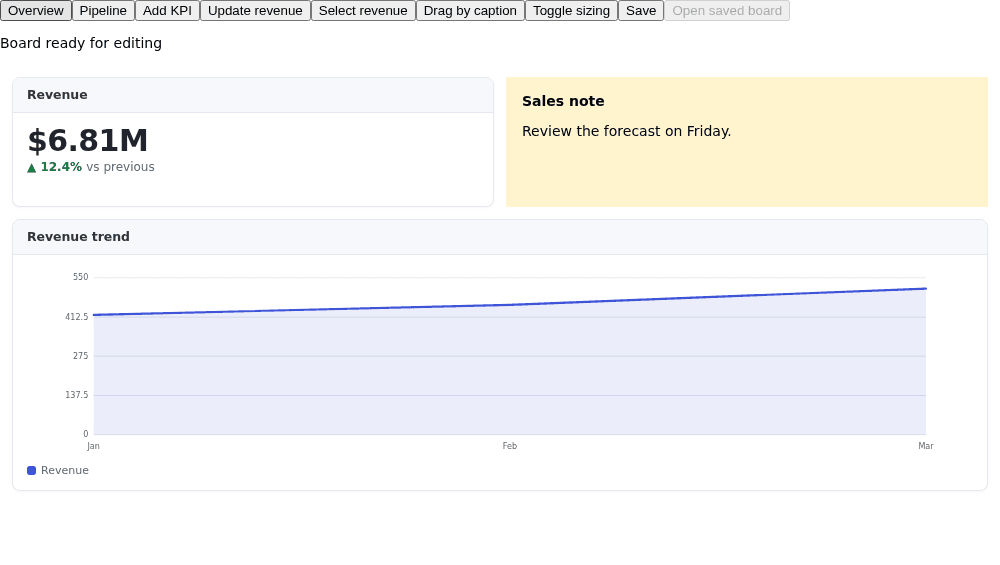
The builder opens an Overview board containing a revenue KPI, a line chart, and a custom note. Its Pipeline view contains a funnel. The toolbar adds a KPI, updates revenue, selects the revenue tile, changes the drag handle or sizing, and saves a snapshot. Restore opens that snapshot in a separate static board, leaving the editable board untouched.
Try the authors' [Dashboard builder](https://grafloria.com/demos/dashboard/dashboard-builder.html) for a larger palette and version browser; its [source](https://github.com/grafloria/grafloria/blob/5c0b626b42b8ca8ae6de46c7962cf0e8c78fda63/demos/dashboard/dashboard-builder.html) uses the same data-first authoring pattern.
### 1. Install the dashboard packages
The quick starts already install these packages. If your project does not have them, use the command for your binding. The framework itself comes from its starter.
JavaScript:
```bash
npm install @grafloria/element @grafloria/engine @grafloria/renderer
```
React:
```bash
npm install @grafloria/react @grafloria/element @grafloria/engine @grafloria/renderer
```
Angular:
```bash
npm install @grafloria/angular @grafloria/element @grafloria/engine @grafloria/renderer
```
Qwik:
```bash
npm install -D @grafloria/qwik @grafloria/element @grafloria/engine @grafloria/renderer
```
### 2. Declare the board and its live actions
Use [`DashboardWidgetSpec`](https://bench-grafloria-61d.atloria.app/p/bench-grafloria-61d-mQCmWpDrxv/developer/grafloria-element-dashboard-kit-dashboardwidgetspec) for each widget, [`DashboardViewSpec`](https://bench-grafloria-61d.atloria.app/p/bench-grafloria-61d-mQCmWpDrxv/developer/grafloria-element-dashboard-kit-interfaces#dashboardviewspec) for each view, and [`DashboardOptions`](https://bench-grafloria-61d.atloria.app/p/bench-grafloria-61d-mQCmWpDrxv/developer/grafloria-element-dashboard-kit-dashboardoptions) for board geometry. Omit `x` and `y` to flow widgets in declaration order, wrapping at the column count. `span` counts columns; `rows` counts rows.
Add this shared file at `src/dashboard-data.ts` in every project. All four bindings consume the same data. `widgets` is the single-view shorthand; do not pass it together with `views` to the same board.
```ts title="src/dashboard-data.ts"
import type {
DashboardHandle,
DashboardOptions,
DashboardViewSpec,
DashboardWidgetSpec,
} from '@grafloria/element';
export const options: DashboardOptions = { columns: 6, gap: 12 };
export const widgets: DashboardWidgetSpec[] = [
{ id: 'revenue', kind: 'kpi', span: 3,
data: { label: 'Revenue', value: '$6.81M', delta: 12.4,
spark: [42, 45, 51, 61, 76] } },
{ id: 'note', kind: 'note', span: 3, title: 'Sales note',
data: { text: 'Review the forecast on Friday.' } },
{ id: 'trend', kind: 'line', span: 6, rows: 2, title: 'Revenue trend',
data: { series: [{ name: 'Revenue', values: [420, 455, 512] }],
labels: ['Jan', 'Feb', 'Mar'] } },
];
export const views: DashboardViewSpec[] = [
{ id: 'overview', name: 'Overview', widgets },
{ id: 'pipeline', name: 'Pipeline', widgets: [
{ id: 'funnel', kind: 'funnel', span: 6, rows: 2, title: 'Pipeline',
data: { stages: [{ label: 'Leads', value: 900 },
{ label: 'Won', value: 210 }] } },
] },
];
let nextWidgetId = 0;
export function actions(handle: DashboardHandle) {
return {
add: () => {
let id: string;
do { id = `added-kpi-${++nextWidgetId}`; } while (handle.widget(id));
const added = handle.addWidget({
id, kind: 'kpi', span: 3,
data: { label: 'New KPI', value: '42' },
});
if (!added) window.alert('This board has no room for another widget.');
},
update: () => handle.widget('revenue')?.update({
data: { label: 'Revenue', value: '$7.02M', delta: 3.1 },
}),
select: () => {
handle.showView('overview');
handle.selectWidget('revenue');
},
caption: () => handle.setDragHandle(true),
sizing: () => handle.setSizing(handle.getSizing() === 'fit' ? 'grow' : 'fit'),
};
}
```
[`DashboardHandle`](https://bench-grafloria-61d.atloria.app/p/bench-grafloria-61d-mQCmWpDrxv/developer/grafloria-element-dashboard-kit-dashboardhandle) is the live façade. `addWidget()` creates the node and its membership as one undoable step and returns a widget handle, or `undefined` when the board refuses the addition. `widget(id)` returns a [`WidgetHandle`](https://bench-grafloria-61d.atloria.app/p/bench-grafloria-61d-mQCmWpDrxv/developer/grafloria-element-dashboard-kit-widgethandle), or `undefined` for an unknown ID. `update()` replaces its `data` and repaints it; it is a data-feed operation, not an undoable inspector edit.
`showView()` frames the named view and parks the others off-camera. `selectWidget()` adds the selection ring without moving keyboard focus. `setDragHandle(true)` restricts dragging to the caption strip; the custom note's top band supplies that strip when it has no kit header. `getSizing()` reads the active view's sizing, and `setSizing()` changes the grid sizing setting. A split view always reports `fit`.
### 3. Mount your binding
Each tab includes the editable multi-view board and a single-view static preview. The latter demonstrates `widgets` without combining it with `views`. Custom notes render through a framework component, slot, or template; built-in kinds need no chart package.
For JavaScript, [`dashboard`](https://bench-grafloria-61d.atloria.app/p/bench-grafloria-61d-mQCmWpDrxv/developer/grafloria-element-dashboard-kit-functions#dashboard) returns a render spec and its handle. [`render`](https://bench-grafloria-61d.atloria.app/p/bench-grafloria-61d-mQCmWpDrxv/developer/grafloria-element-core#render) mounts it and runs its finalization automatically. Use [`defaultWidgetRenderer`](https://bench-grafloria-61d.atloria.app/p/bench-grafloria-61d-mQCmWpDrxv/developer/grafloria-element-dashboard-kit-constants#defaultwidgetrenderer) for kinds your painter does not own.
For React, render [`GrafloriaDashboard`](https://bench-grafloria-61d.atloria.app/p/bench-grafloria-61d-mQCmWpDrxv/developer/grafloria-react#grafloriadashboard) and type custom component props with [`WidgetProps`](https://bench-grafloria-61d.atloria.app/p/bench-grafloria-61d-mQCmWpDrxv/developer/grafloria-react#widgetprops). For Vue, render [`GrafloriaDashboard`](https://bench-grafloria-61d.atloria.app/p/bench-grafloria-61d-mQCmWpDrxv/developer/grafloria-vue#grafloriadashboard) and supply `#widget-note`. Angular uses [`GrafloriaDashboardComponent`](https://bench-grafloria-61d.atloria.app/p/bench-grafloria-61d-mQCmWpDrxv/developer/grafloria-angular-components-grafloriadashboardcomponent) and [`GrafloriaWidgetDefDirective`](https://bench-grafloria-61d.atloria.app/p/bench-grafloria-61d-mQCmWpDrxv/developer/grafloria-angular-components-classes#grafloriawidgetdefdirective). Qwik uses [`GrafloriaDashboard`](https://bench-grafloria-61d.atloria.app/p/bench-grafloria-61d-mQCmWpDrxv/developer/grafloria-qwik#grafloriadashboard) and [`WidgetProps`](https://bench-grafloria-61d.atloria.app/p/bench-grafloria-61d-mQCmWpDrxv/developer/grafloria-qwik#widgetprops); keep its live handle in `noSerialize()` state.
The JavaScript entry preserves the quick start's stylesheet import. In React, add the component below to the existing app rather than replacing its entry file. In Angular, import `DashboardBuilderComponent` into the existing root component's `imports` and add `` to its template, retaining the router outlet. In Qwik, import the default component from `../../DashboardBuilder` in `src/routes/dashboard/index.tsx`, render `` in that route, and open `/dashboard/`.
:::code-group
```ts title="JavaScript — src/main.ts"
import './style.css';
import { dashboard, defaultWidgetRenderer, render } from '@grafloria/element';
import type { DashboardSnapshot, DashboardWidgetSpec } from '@grafloria/element';
import { actions, options, views, widgets } from './dashboard-data';
const app = document.getElementById('app')!;
app.replaceChildren();
const toolbar = document.createElement('nav');
const board = document.createElement('div');
board.style.height = '500px';
const preview = document.createElement('div');
preview.style.height = '300px';
const restored = document.createElement('div');
restored.style.height = '500px';
app.append(toolbar, board, preview, restored);
function paint(widget: DashboardWidgetSpec, host: HTMLElement): void {
if (widget.kind !== 'note') {
defaultWidgetRenderer(widget, host);
return;
}
const note = document.createElement('div');
note.style.cssText = 'height:100%;padding:16px;box-sizing:border-box;background:#fff4ce';
note.textContent = `${widget.title}: ${String(widget.data?.['text'] ?? '')}`;
host.replaceChildren(note);
}
const spec = dashboard({ ...options, views, renderWidget: paint });
const editor = render(spec, board);
const single = render(dashboard({ ...options, widgets, static: true,
renderWidget: paint }), preview);
let saved: DashboardSnapshot | undefined;
let restoredInstance: ReturnType | undefined;
const commands = actions(spec.handle);
function button(label: string, run: () => void): void {
const element = document.createElement('button');
element.textContent = label;
element.onclick = run;
toolbar.append(element);
}
button('Overview', () => spec.handle.showView('overview'));
button('Pipeline', () => spec.handle.showView('pipeline'));
button('Add KPI', commands.add);
button('Update revenue', commands.update);
button('Select revenue', commands.select);
button('Drag by caption', commands.caption);
button('Toggle sizing', commands.sizing);
button('Save', () => { saved = spec.handle.toJSON(); });
button('Restore separately', () => {
if (!saved) return;
restoredInstance?.dispose();
restoredInstance = render(dashboard({ ...saved, static: true,
renderWidget: paint }), restored);
});
button('Close dashboard', () => {
editor.dispose();
single.dispose();
restoredInstance?.dispose();
app.replaceChildren();
});
```
```tsx title="React — src/DashboardBuilder.tsx"
import { lazy, Suspense, useRef, useState } from 'react';
import type { WidgetProps } from '@grafloria/react';
import type { DashboardHandle, DashboardSnapshot } from '@grafloria/element';
import { actions, options, views, widgets } from './dashboard-data';
const GrafloriaDashboard = lazy(() => import('@grafloria/react').then(module => ({
default: module.GrafloriaDashboard,
})));
function Note({ widget, data }: WidgetProps) {
return
}
;
});
```
:::
The React sample opens with the KPI and custom note above the line chart, plus a static single-view preview below.
In React and Qwik, `widgetTypes` maps a kind to a component receiving `{ widget, data }`. In Vue, slots receive that same context. Angular's `let-widget` receives the full spec and `let-data="data"` receives the payload. Kinds without a custom renderer use the shipped painters. React's `children` renders inside the dashboard root; the sample uses it for the Dashboard editor overlay.
The component's ready callback or output supplies the mounted handle. Layout callbacks report the affected view and its widget specs with live cells. The status line above follows those callbacks, including layout changes from history, rather than counting toolbar clicks.
### Vue: mount the dashboard kit as a component
Start in the [Vue quick start](https://bench-grafloria-61d.atloria.app/p/bench-grafloria-61d-mQCmWpDrxv/developer/vue-quick-start) project and install any missing packages:
```bash
npm install @grafloria/vue @grafloria/element @grafloria/engine @grafloria/renderer
```
Add this component to your existing root. It uses the shared data and actions from step 2. The Overview and Pipeline buttons write the active-view binding; the note renders through `#widget-note`, while the KPI, line and funnel use the built-in painters. Save records the live snapshot. Open saved board mounts a separate static preview rather than replacing the editor.
```vue title="src/VueBoard.vue"
{{ message }}
{{ widget.title }}
{{ data['text'] }}
Saved board
{{ data['text'] }}
```
The Vue component emits `ready` with its handle and `layoutChange` with the affected view and live widgets. `v-model:active-view` drives `showView()` through the binding. Keep the same slots on the saved-board component: snapshot data does not contain their rendering functions. Each saved preview is a fresh mount; changing the editor's `views` prop is not a reload operation.
## Save and restore the live layout
1. Arrange the editable board, then press Save. `toJSON()` returns a [`DashboardSnapshot`](https://bench-grafloria-61d.atloria.app/p/bench-grafloria-61d-mQCmWpDrxv/developer/grafloria-element-dashboard-kit-types#dashboardsnapshot) read from the live board, not the original literal.
2. Make another edit. Press Restore separately. The sample mounts the saved snapshot through `dashboard()` or the framework component in a separate static view. It never replaces your newer work.
3. Supply the same custom painter, component map, slots, or templates when mounting the restored board. Functions are app code, not snapshot data.
The samples keep the snapshot in application memory. For a JSON representation, use `JSON.stringify(handle.toJSON())`. This dashboard snapshot is an authoring format, not an integrity-checked full diagram document. Use [Save and restore documents](https://bench-grafloria-61d.atloria.app/p/bench-grafloria-61d-mQCmWpDrxv/developer/save-and-restore) for versioned document storage and validation.
| Snapshot content | Restored result |
| --- | --- |
| Views, widgets, titles, kinds, payloads, live cells and pinning | Rebuilt from the snapshot |
| Columns, gap, row height, sizing, float, RTL and static settings | Retained; the preview deliberately overrides `static` to `true` |
| Per-view layout and split trees | Retained |
| Responsive layouts | Saves the widest cached layout, not only the currently narrow arrangement |
| Painter functions and event callbacks | Supplied again by your app |
| Top-level active view, selection, camera and undo history | Not in the dashboard snapshot; the restored board starts with its boot view |
Framework boards read `views`, `widgets`, and `options` at mount. Updating those props does not reload the board. The React and Qwik restore samples change a key to mount a new preview; Angular replaces the tracked preview object to mount a new component. `activeView`, `layout`, `sizing`, and `static` are live switches, not reload inputs.
## Choose layout, sizing, and widget kinds
These choices apply to JavaScript options and the framework inputs alike.
| Option | Type | Default | What it does |
| --- | --- | --- | --- |
| `layout` | `'grid' \| 'split'` | `'grid'` | `grid` packs widgets in cells; `split` covers the board with a splitter tree and percentage dividers. Split always fits. |
| `sizing` | `'fit' \| 'grow'` | `grow` on fluid boards; `fit` on fixed boards | `fit` keeps the board height and squeezes rows; `grow` keeps row height and extends downward. |
| `columns` | `number` | `12` | Column count; each view can override it. |
| `gap` | `number` | `8` | Widget spacing and board padding in pixels. |
| `rowHeight` | `number` | `130` | Row height in grow mode. |
| `static` | `boolean` | `false` | Disables pointer dragging, resizing and handles; API operations still work. |
The layout button switches between `grid` and `split` through the component's live `layout` input. Toggle sizing uses the handle. The Angular sample starts with `fit` to keep the editable board within its host. The other samples start with fluid grow sizing.
The six built-in kinds read these payload fields:
| `kind` | `data` fields | What renders |
| --- | --- | --- |
| `kpi` | `label`, `value`, `delta`, `deltaLabel`, `spark` | Formatted headline, signed delta and sparkline |
| `line` | `series`, `labels` | A line chart; series accepts bare numbers or named series with `values` |
| `bar` | `bars` containing `label` and `value` | Bars with labels |
| `donut` | `slices` containing `label`, `value`, optional `color`; `centerLabel`, `centerCaption` | Donut segments and center text |
| `funnel` | `stages` containing `label` and `value` | Stages scaled against the largest value, with a minimum width to fit each value |
| `table` | `columns`, `rows` | Table cells; numeric cells right-align |
Fields are optional. Missing or invalid data paints an empty state; an unknown kind paints a titled placeholder unless you provide a custom renderer.
## Pitfalls and related tasks
- Use the handle for edits after mount. Do not replace a `views` array and expect the live board to rebuild.
- In framework bindings, custom painting belongs in `widgetTypes`, slots, or templates. The bindings install their own `renderWidget` and layout callback, replacing those functions inside `options`.
- A bounded fit board can refuse an addition, move, or resize that needs more rows than it can hold. Check the return value rather than assuming an addition succeeds.
- Custom widget hosts survive canvas repaints. Give a widget its own data flow when it must react independently; see [Compute connected data](https://bench-grafloria-61d.atloria.app/p/bench-grafloria-61d-mQCmWpDrxv/developer/compute-connected-data).
- For resolved host heights, see [Nest containers and lanes](https://bench-grafloria-61d.atloria.app/p/bench-grafloria-61d-mQCmWpDrxv/developer/nest-containers). For Qwik browser-only objects, see [Qwik resumable integration](https://bench-grafloria-61d.atloria.app/p/bench-grafloria-61d-mQCmWpDrxv/developer/qwik-resumable-integration).
For grid policies and lower-level integration, continue with [Configure dashboard layout](https://bench-grafloria-61d.atloria.app/p/bench-grafloria-61d-mQCmWpDrxv/developer/configure-dashboard-layout). [`bindDashboardGrid`](https://bench-grafloria-61d.atloria.app/p/bench-grafloria-61d-mQCmWpDrxv/developer/grafloria-element-dashboard-kit-functions#binddashboardgrid) binds gestures to an existing board group; the dashboard authoring API already does that for you. [`cellToRect`](https://bench-grafloria-61d.atloria.app/p/bench-grafloria-61d-mQCmWpDrxv/developer/grafloria-element-dashboard-kit-functions#celltorect) projects cells into world rectangles, while [`pointToCell`](https://bench-grafloria-61d.atloria.app/p/bench-grafloria-61d-mQCmWpDrxv/developer/grafloria-element-dashboard-kit-functions#pointtocell) maps a world position to the nearest cell without engine clamping. Neither is needed to declare this builder. `refresh()` re-reads boards after out-of-band model mutations; normal handle operations and history already synchronize them.
Use [Commands and history](https://bench-grafloria-61d.atloria.app/p/bench-grafloria-61d-mQCmWpDrxv/developer/commands-and-history) for undoable app-side edits, and [Export images and vector PDF](https://bench-grafloria-61d.atloria.app/p/bench-grafloria-61d-mQCmWpDrxv/developer/export-diagram) for scoped exports of one dashboard view.