# Angular: state and tooling
Use this pattern when your Angular application owns the diagram state and needs an editor around it. You get two connected nodes, camera bindings, history buttons, interaction settings, a selection-driven node toolbar, and a property panel.
The binding is a thin skin over the headless model: your specs describe intent, the live models hold data, and the engine owns behavior. Use [`DiagramCanvasComponent`](https://bench-grafloria-61d.atloria.app/p/bench-grafloria-61d-mQCmWpDrxv/developer/grafloria-angular-components-diagramcanvascomponent#diagramcanvascomponent) for the canvas and its everyday methods; reach through `activeEngine()` only for tools that require the engine.
## 1. Set the application default
In an Angular 18.1–22 application, install the binding and its peers:
```bash
npm install @grafloria/angular @angular/common @angular/core @angular/forms @angular/platform-browser @grafloria/engine @grafloria/renderer rxjs @grafloria/element
```
[`provideGrafloria`](https://bench-grafloria-61d.atloria.app/p/bench-grafloria-61d-mQCmWpDrxv/developer/grafloria-angular-core#providegrafloria) accepts a [`GrafloriaConfig`](https://bench-grafloria-61d.atloria.app/p/bench-grafloria-61d-mQCmWpDrxv/developer/grafloria-angular-core#grafloriaconfig). Its theme applies to canvases without an explicit `[theme]` input; an explicit input wins. This example uses the shipped [`DARK_THEME`](https://bench-grafloria-61d.atloria.app/p/bench-grafloria-61d-mQCmWpDrxv/developer/grafloria-renderer-themes-constants#dark_theme).
```ts title="src/main.ts"
import { bootstrapApplication } from '@angular/platform-browser';
import { provideGrafloria } from '@grafloria/angular';
import { DARK_THEME } from '@grafloria/renderer';
import { AppComponent } from './app/app.component';
bootstrapApplication(AppComponent, {
providers: [provideGrafloria({ theme: DARK_THEME })],
}).catch(console.error);
```
## 2. Bind state and mount the supplied tools
Bind all four `model()` signals: `[(nodes)]`, `[(edges)]`, `[(viewport)]`, and `[(zoom)]`. Each also exposes its next-value output: `nodesChange`, `edgesChange`, `viewportChange`, and `zoomChange`. Plain properties and writable signals both work.
Type the collections with [`NodeSpec`](https://bench-grafloria-61d.atloria.app/p/bench-grafloria-61d-mQCmWpDrxv/developer/grafloria-renderer-instance-nodespec#nodespec) and [`EdgeSpec`](https://bench-grafloria-61d.atloria.app/p/bench-grafloria-61d-mQCmWpDrxv/developer/grafloria-renderer-instance-edgespec#edgespec). The inputs also accept live [`NodeModel`](https://bench-grafloria-61d.atloria.app/p/bench-grafloria-61d-mQCmWpDrxv/developer/grafloria-engine-models-nodemodel#nodemodel) and [`LinkModel`](https://bench-grafloria-61d.atloria.app/p/bench-grafloria-61d-mQCmWpDrxv/developer/grafloria-engine-models-linkmodel#linkmodel) objects. Keeping the input's full type in the sample accommodates the two-way output contract, including `undefined`.
The supplied [`InteractionConfigPanelComponent`](https://bench-grafloria-61d.atloria.app/p/bench-grafloria-61d-mQCmWpDrxv/developer/grafloria-angular-components-interactionconfigpanelcomponent#interactionconfigpanelcomponent) reads and updates the mounted canvas's engine. Its `configChanged` output reports the partial configuration it applies; you do not need to apply it again.
The supplied [`NodeToolbarComponent`](https://bench-grafloria-61d.atloria.app/p/bench-grafloria-61d-mQCmWpDrxv/developer/grafloria-angular-components-nodetoolbarcomponent#nodetoolbarcomponent) renders actions for the selected live node. Use the shipped [`createDuplicateAction`](https://bench-grafloria-61d.atloria.app/p/bench-grafloria-61d-mQCmWpDrxv/developer/grafloria-angular-components-functions#createduplicateaction) rather than implementing duplication yourself.
The sample also mounts [`LinkToolbarComponent`](https://bench-grafloria-61d.atloria.app/p/bench-grafloria-61d-mQCmWpDrxv/developer/grafloria-angular-components-linktoolbarcomponent#linktoolbarcomponent) for the selected edge, using the shipped [`createDeleteLinkAction`](https://bench-grafloria-61d.atloria.app/p/bench-grafloria-61d-mQCmWpDrxv/developer/grafloria-angular-components-functions#createdeletelinkaction). It disables the canvas's hosted edge toolbar to avoid displaying two toolbars.
> **Known issue:** Binding the canvas's camera rectangle directly to the node toolbar's `[viewport]` mispositions it after pan or zoom: the toolbar treats `x` and `y` as pixel translations. Until it is fixed, derive those translations from `(viewportChanged)`, the visible world rectangle, as the sample does.
The intended toolbar binding is `[viewport]="viewport()"`. The runnable version below instead uses `[viewport]="toolbarViewport()"` and updates it from the visible rectangle.
Use [`PropertyPanelComponent`](https://bench-grafloria-61d.atloria.app/p/bench-grafloria-61d-mQCmWpDrxv/developer/grafloria-angular-components-propertypanelcomponent#propertypanelcomponent) with a schema registered through [`PropertyPanelService`](https://bench-grafloria-61d.atloria.app/p/bench-grafloria-61d-mQCmWpDrxv/developer/grafloria-angular-services-propertypanelservice#propertypanelservice). The schema uses the shipped string editor. [`PropertySchema`](https://bench-grafloria-61d.atloria.app/p/bench-grafloria-61d-mQCmWpDrxv/developer/grafloria-renderer-types-interfaces-b-s#propertyschema) describes the fields, while [`PropertyDiagramNode`](https://bench-grafloria-61d.atloria.app/p/bench-grafloria-61d-mQCmWpDrxv/developer/grafloria-angular-services#propertydiagramnode) supplies their values.
> **Known issue:** The property service writes directly into `node.data`, without issuing a model mutation or an engine command. Until it is fixed, edit detached drafts and return their values through controlled specs. This updates the diagram, but these property edits do not join the undo stack or emit `modelChange`.
```ts title="src/app/app.component.ts"
import {
AfterViewInit, Component, ElementRef, OnDestroy,
computed, effect, signal, viewChild,
} from '@angular/core';
import {
DiagramCanvasComponent, InteractionConfigPanelComponent,
NodeToolbarComponent, LinkToolbarComponent, PropertyPanelComponent, PropertyPanelService,
createDuplicateAction, createDeleteLinkAction,
type PropertyDiagramNode, type ToolbarAction, type LinkToolbarAction,
} from '@grafloria/angular';
import { NodeModel, type LinkModel } from '@grafloria/engine';
import type { EdgeSpec, NodeSpec, PropertySchema } from '@grafloria/renderer';
@Component({
selector: 'app-root',
standalone: true,
imports: [
DiagramCanvasComponent, InteractionConfigPanelComponent,
NodeToolbarComponent, LinkToolbarComponent, PropertyPanelComponent,
],
providers: [PropertyPanelService],
template: `
{{ status() }} · Zoom: {{ zoom() }}
@if (canvas().activeEngine(); as engine) {
@if (selected(); as node) {
}
@if (selectedEdge(); as link) {
}
}
{{ lastPatch() }}
`,
})
export class AppComponent implements AfterViewInit, OnDestroy {
canvas = viewChild.required(DiagramCanvasComponent);
propertyPanel = viewChild(PropertyPanelComponent);
host = viewChild.required>('host');
nodes = signal([
{ id: 'a', type: 'task', label: 'Extract', data: { label: 'Extract' },
position: { x: 80, y: 100 }, size: { width: 140, height: 70 } },
{ id: 'b', type: 'task', label: 'Load', data: { label: 'Load' },
position: { x: 320, y: 100 }, size: { width: 140, height: 70 } },
]);
edges = signal([
{ id: 'ab', source: 'a', target: 'b' },
]);
viewport = signal({ x: 0, y: 0, width: 800, height: 400 });
zoom = signal(1);
visibleRect = signal({ x: 0, y: 0, width: 800, height: 400 });
toolbarViewport = computed(() => {
const rect = this.visibleRect();
return { x: -rect.x * this.zoom(), y: -rect.y * this.zoom(),
width: rect.width, height: rect.height };
});
selected = signal(null);
selectedEdge = signal(null);
drafts = signal([]);
actions = computed(() => {
const engine = this.canvas().activeEngine();
return engine ? [createDuplicateAction(engine)] : [];
});
linkActions = computed(() => {
const engine = this.canvas().activeEngine();
return engine ? [createDeleteLinkAction(engine)] : [];
});
status = signal('Select a node to edit its label');
lastPatch = signal('');
private resizeObserver?: ResizeObserver;
constructor(properties: PropertyPanelService) {
const schema: PropertySchema = {
properties: [{ key: 'label', label: 'Label', editor: 'string' }],
};
properties.registerSchema('task', schema);
effect(() => {
const panel = this.propertyPanel();
const drafts = this.drafts();
if (panel) panel.selectedNodes = drafts;
});
}
ngAfterViewInit(): void {
this.resizeObserver = new ResizeObserver(() => this.canvas().scheduleRender());
this.resizeObserver.observe(this.host().nativeElement);
}
select(nodes: NodeModel[], edges: LinkModel[]): void {
this.selected.set(nodes[0] ?? null);
this.selectedEdge.set(edges[0] ?? null);
this.drafts.set(nodes.map(node => ({
id: node.id, type: node.type, data: { ...node.data },
})));
}
commitDrafts(): void {
this.nodes.update(nodes => (nodes ?? []).map(node => {
if (node instanceof NodeModel) return node;
const draft = this.drafts().find(item => item.id === node.id);
if (!draft || typeof draft.data['label'] !== 'string') return node;
return { ...node, label: draft.data['label'], data: { ...draft.data } };
}));
this.status.set('Label returned through controlled specs');
}
recordPatch(patch: Parameters[0]): void {
this.lastPatch.set(JSON.stringify(patch, null, 2));
this.status.set('Engine change captured');
}
async undo(): Promise { await this.canvas().undo(); }
async redo(): Promise { await this.canvas().redo(); }
flush(): void { this.canvas().flushModelChange(); }
ngOnDestroy(): void { this.resizeObserver?.disconnect(); }
}
```
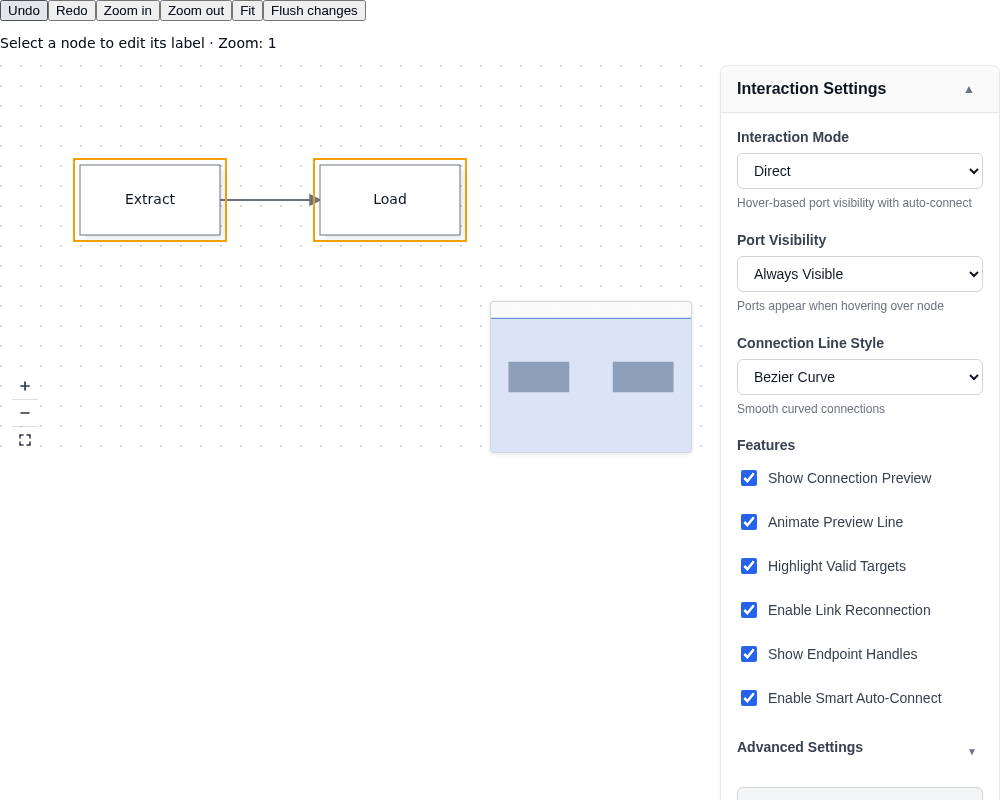
On load, the canvas contains Extract connected to Load, with the supplied minimap and zoom/fit controls. The settings panel opens expanded; the property panel starts in its empty state. Select a node to show its Duplicate toolbar and Label editor. Editing Label returns a new spec array to the canvas. Dragging a node updates the two-way collections and displays the engine's incremental patch beneath the editor.
Select the edge to show its Delete toolbar. The property panel receives drafts through its `selectedNodes` setter, reached with `viewChild`, rather than a template binding.
## 3. Consume patches and component methods
`modelChange` describes added, removed, and modified entities. It accompanies the next-array outputs, but fires only for engine-originated changes: inbound `[nodes]` and `[edges]` writes are not echoed. Use it to persist user changes rather than saving your own inbound writes again.
The canvas coalesces engine events in a microtask. `flushModelChange()` synchronously drains the pending capture window; it returns `void` and emits nothing when no change exists. The sample's Flush changes button exercises that call without fabricating a patch. The JSON readout is an inspection hook, not a complete persistence store; save the live document as described in [Save and restore documents](https://bench-grafloria-61d.atloria.app/p/bench-grafloria-61d-mQCmWpDrxv/developer/save-and-restore-documents).
`viewChild.required(DiagramCanvasComponent)` gives you the mounted component. `undo()` and `redo()` return `Promise`; the sample awaits them. `zoomIn()`, `zoomOut()`, and `fitToContent()` change the camera. Engine access is available from `ngAfterViewInit` onward. History availability belongs to the engine's `canUndo()` and `canRedo()`, not to component methods of those names.
Persist `viewportChange`, the camera rectangle used by the input. Use `viewportChanged` for the visible world rectangle after zoom or pan; they are not interchangeable.
## Responsive canvases
[`ResponsiveCanvasDirective`](https://bench-grafloria-61d.atloria.app/p/bench-grafloria-61d-mQCmWpDrxv/developer/grafloria-angular-core#responsivecanvasdirective) uses the selector `[grafloriaResponsiveCanvas]`. Its `[engine]` input expects [`IResponsiveCanvasEngine`](https://bench-grafloria-61d.atloria.app/p/bench-grafloria-61d-mQCmWpDrxv/developer/grafloria-angular-core#iresponsivecanvasengine), not the canvas's [`DiagramEngine`](https://bench-grafloria-61d.atloria.app/p/bench-grafloria-61d-mQCmWpDrxv/developer/grafloria-engine-engine#diagramengine).
> **Known issue:** `[engine]="canvas().activeEngine()"` cannot wire the responsive directive to this canvas: its engine contract requires `getZoom()`, `getPan()`, and `setPan()`, which the diagram engine does not implement. Until it is fixed, observe the wrapper and call `scheduleRender()`, as the mounted sample does.
The observer requests a repaint after the wrapper changes size. The canvas measures that wrapper when deriving its rendered viewport. Cleanup disconnects the observer on component destruction. For wrapper sizing rules, see [Theme a canvas](https://bench-grafloria-61d.atloria.app/p/bench-grafloria-61d-mQCmWpDrxv/developer/theme-a-canvas).
## Options that matter
| Option | Type | Default | What it does |
|---|---|---|---|
| `nodes` | `readonly (NodeSpec \| NodeModel)[] \| undefined` | `undefined` | Controls nodes; unbound leaves the engine's node set alone. |
| `edges` | `readonly (EdgeSpec \| LinkModel)[] \| undefined` | `undefined` | Controls edges and returns the next collection. |
| `skipModelUpdate` | `boolean` | `false` | Suspends inbound reconciliation only; outbound emissions continue. Switching back resumes synchronization. |
| `viewport` | Rectangle with numeric `x`, `y`, `width`, `height` | `{ x: 0, y: 0, width: 800, height: 600 }` | Two-way camera rectangle. |
| `zoom` | `number` | `1` | Two-way zoom level. |
| Settings panel `expanded` | `boolean` | `false` | Opens the panel on initialization when true. |
| Settings panel `showAdvanced` | `boolean` | `true` | Includes advanced settings. |
| Property panel `updateMode` | `'immediate' \| 'deferred'` | `'immediate'` | Applies valid edits immediately or holds them until Save. |
| Property panel `showHeader` | `boolean` | `true` | Displays the selected-node header. |
| Property panel `collapsibleGroups` | `boolean` | `true` | Lets the reader collapse property groups. |
## Pitfalls and alternatives
- Leave `nodes` and `edges` unbound and supply `[engine]` for uncontrolled use. In controlled use, keep the next-value return path: two-way binding provides it in this sample.
- Use the property panel's UI output for UI edits. Its `propertyChanged` payload has `nodes`, `property`, and `value`; the service's change observable uses a different payload with `propertyKey` and `newValue`.
- [`PropertyEditorRegistryService`](https://bench-grafloria-61d.atloria.app/p/bench-grafloria-61d-mQCmWpDrxv/developer/grafloria-angular-services#propertyeditorregistryservice) registers the built-in editors on initialization. Register a custom editor only when a shipped editor does not cover your field.
- [`AutoToolbarDirective`](https://bench-grafloria-61d.atloria.app/p/bench-grafloria-61d-mQCmWpDrxv/developer/grafloria-angular-components-classes#autotoolbardirective) and [`NodeToolbarService`](https://bench-grafloria-61d.atloria.app/p/bench-grafloria-61d-mQCmWpDrxv/developer/grafloria-angular-components-classes#nodetoolbarservice) offer automatic selection-based and programmatic toolbar management. The sample uses the component directly so it can pass the corrected viewport translation through Angular inputs.
- Edges already have a hosted toolbar: hover or select an edge to expose its default delete and insert-node actions. Configure it through the canvas's `enableLinkToolbar`, `linkToolbarActions`, and `linkToolbarAnchor` inputs when you do not need the explicit selection-driven toolbar shown here.
- For data changes that also need layout, follow [Lay out a diagram](https://bench-grafloria-61d.atloria.app/p/bench-grafloria-61d-mQCmWpDrxv/developer/lay-out-a-diagram).
## Live demos and related guides
Explore the [node toolbar demo](https://grafloria.com/demos/nodes/node-toolbar.html), the [shape data panel demo](https://grafloria.com/demos/diagrams/shape-data.html), and [minimap and controls](https://grafloria.com/demos/misc/minimap-and-controls.html). Their Angular variants are available in the [Angular gallery](https://grafloria.com/demos-angular/).
Continue with [Angular templates and handles](https://bench-grafloria-61d.atloria.app/p/bench-grafloria-61d-mQCmWpDrxv/developer/angular-templates-and-handles), [State and event flow](https://bench-grafloria-61d.atloria.app/p/bench-grafloria-61d-mQCmWpDrxv/developer/state-and-event-flow), or [Commands and history](https://bench-grafloria-61d.atloria.app/p/bench-grafloria-61d-mQCmWpDrxv/developer/commands-and-history).