# Add editor controls
Use editor controls when readers need to navigate a diagram and act on its nodes and edges. The examples below add a dotted background, a live minimap, zoom and fit buttons, node actions, a right-click menu, and an edge-delete button to a two-node diagram.
## 1. Install the packages
Run the command for your framework in your own project. The shared action code uses the shipped Angular action presets even when the canvas uses another binding, except in the Qwik workaround below.
JavaScript:
```bash
npm install @grafloria/element @grafloria/renderer @grafloria/engine @grafloria/angular @angular/common @angular/core @angular/forms @angular/platform-browser rxjs
```
Angular:
```bash
npm install @grafloria/angular @angular/common @angular/core @angular/forms @angular/platform-browser @grafloria/engine @grafloria/renderer @grafloria/element rxjs
```
Qwik:
```bash
npm install @grafloria/qwik @builder.io/qwik @grafloria/element @grafloria/renderer @grafloria/engine
```
React:
```bash
npm install @grafloria/react react react-dom @grafloria/element @grafloria/renderer @grafloria/engine @grafloria/angular @angular/common @angular/core @angular/forms @angular/platform-browser rxjs
```
Vue:
```bash
npm install @grafloria/vue vue @grafloria/element @grafloria/renderer @grafloria/engine @grafloria/angular @angular/common @angular/core @angular/forms @angular/platform-browser rxjs
```
## 2. Share the data and action wiring
Specs describe the boxes and wire; the mounted instance owns their live models. Type the data with [`NodeSpec`](https://bench-grafloria-61d.atloria.app/p/bench-grafloria-61d-mQCmWpDrxv/developer/grafloria-renderer-instance-nodespec#nodespec) and [`EdgeSpec`](https://bench-grafloria-61d.atloria.app/p/bench-grafloria-61d-mQCmWpDrxv/developer/grafloria-renderer-instance-edgespec#edgespec).
The node strip uses Duplicate and Delete from [`createStandardPreset`](https://bench-grafloria-61d.atloria.app/p/bench-grafloria-61d-mQCmWpDrxv/developer/grafloria-angular-components-functions#createstandardpreset). The right-click menu takes those same two actions from [`createContextMenuPreset`](https://bench-grafloria-61d.atloria.app/p/bench-grafloria-61d-mQCmWpDrxv/developer/grafloria-angular-components-functions#createcontextmenupreset). Choosing only these actions keeps this example focused on copying and removing boxes rather than supplying an editing dialog.
The edge button uses the Delete action from [`createDefaultLinkActions`](https://bench-grafloria-61d.atloria.app/p/bench-grafloria-61d-mQCmWpDrxv/developer/grafloria-angular-components-functions#createdefaultlinkactions). Angular also offers its built-in path-anchored toolbar through `enableLinkToolbar`; that toolbar includes Insert node and Delete by default. Inserting a node splits the link as one undoable step.
> **Known issue:** The shipped node Delete action removes the node directly from the model, bypassing undo history. Until it is fixed, replace that action's `onClick` with `engine.removeNode(node.id)` as below.
The helper accepts the library's [`CanvasPluginHost`](https://bench-grafloria-61d.atloria.app/p/bench-grafloria-61d-mQCmWpDrxv/developer/grafloria-renderer-ext-components#canvaspluginhost) surface. Pass the live [`DiagramInstance`](https://bench-grafloria-61d.atloria.app/p/bench-grafloria-61d-mQCmWpDrxv/developer/grafloria-renderer-instance-diagraminstance#diagraminstance) in JavaScript, React and Vue; the Angular example supplies its canvas's active engine and camera. It returns a cleanup function for unmount. Qwik uses the separate component below.
```ts title="editor.ts"
import {
createStandardPreset,
createContextMenuPreset,
createDefaultLinkActions,
} from '@grafloria/angular';
import type { CanvasPluginHost, NodeSpec, EdgeSpec } from '@grafloria/renderer';
export const nodes: NodeSpec[] = [
{ id: 'a', label: 'Draft', data: { label: 'Draft' }, selected: true,
position: { x: 100, y: 130 }, size: { width: 150, height: 70 } },
{ id: 'b', label: 'Publish', data: { label: 'Publish' },
position: { x: 410, y: 130 }, size: { width: 150, height: 70 } },
];
export const edges: EdgeSpec[] = [
{ id: 'e', source: 'a', target: 'b', type: 'smooth' },
];
export function installEditor(host: CanvasPluginHost, repaint: () => void): () => void {
const engine = host.getEngine();
const model = host.getModel();
const container = host.container;
const bar = document.createElement('div');
const menu = document.createElement('div');
const edgeBar = document.createElement('div');
const coordinates = document.createElement('output');
for (const element of [bar, menu, edgeBar]) {
element.style.cssText = 'position:absolute;z-index:10;display:none;gap:6px;' +
'padding:6px;background:#fff;border:1px solid #64748b;border-radius:6px';
container.appendChild(element);
}
coordinates.style.cssText = 'position:absolute;top:8px;right:8px;z-index:10;' +
'background:white;padding:4px;font:12px monospace';
coordinates.textContent = 'Move the pointer to read world coordinates';
container.appendChild(coordinates);
const standard = createStandardPreset(engine);
const context = createContextMenuPreset(engine);
const nodeActions = (standard.actionGroups ?? []).flatMap(group => group.actions)
.filter(action => action.id === 'duplicate' || action.id === 'delete');
const menuActions = (context.actionGroups ?? []).flatMap(group => group.actions)
.filter(action => action.id === 'duplicate' || action.id === 'delete');
// Intended shipped call: action.onClick(node).
// Replace only the defective node-delete implementation.
for (const action of [...nodeActions, ...menuActions]) {
if (action.id === 'delete') {
action.onClick = node => {
void engine.removeNode(node.id).then(repaint);
};
}
}
let selectedId: string | undefined;
let menuId: string | undefined;
function addButton(parent: HTMLElement, label: string, run: () => void) {
const button = document.createElement('button');
button.type = 'button';
button.textContent = label;
button.addEventListener('pointerdown', event => event.stopPropagation());
button.addEventListener('click', event => {
event.stopPropagation();
run();
});
parent.appendChild(button);
}
for (const action of nodeActions) {
addButton(bar, action.label, () => {
const node = selectedId ? model.getNode(selectedId) : undefined;
if (node) action.onClick(node);
repaint();
});
}
for (const action of menuActions) {
addButton(menu, action.label, () => {
const node = menuId ? model.getNode(menuId) : undefined;
if (node) action.onClick(node);
menu.style.display = 'none';
repaint();
});
}
const deleteLink = createDefaultLinkActions(engine)
.find(action => action.id === 'delete-link');
if (deleteLink) {
addButton(edgeBar, deleteLink.label, () => {
const link = model.getLink('e');
if (!link) return;
const point = link.points[Math.floor(link.points.length / 2)];
if (point) deleteLink.onClick({ link, engine, t: 0.5, point });
});
}
function openMenu(event: MouseEvent) {
if (!(event.target instanceof Element)) return;
const id = event.target.closest('[data-node-id]')?.getAttribute('data-node-id');
if (!id || !model.getNode(id)) return;
event.preventDefault();
menuId = id;
const rect = container.getBoundingClientRect();
menu.style.left = `${event.clientX - rect.left}px`;
menu.style.top = `${event.clientY - rect.top}px`;
menu.style.display = 'flex';
}
function dismiss(event: PointerEvent) {
if (!(event.target instanceof Node) || !menu.contains(event.target)) {
menu.style.display = 'none';
}
}
function escape(event: KeyboardEvent) {
if (event.key === 'Escape') menu.style.display = 'none';
}
function readPoint(event: PointerEvent) {
const world = host.viewport.clientToWorld(
event.clientX, event.clientY, container.getBoundingClientRect(),
);
coordinates.textContent = `world: ${world.x.toFixed(1)}, ${world.y.toFixed(1)}`;
}
container.addEventListener('contextmenu', openMenu);
container.addEventListener('pointermove', readPoint);
document.addEventListener('pointerdown', dismiss);
document.addEventListener('keydown', escape);
let frame = 0;
function positionOverlays() {
const rect = container.getBoundingClientRect();
const selected = model.getNodes().filter(node => node.isSelected());
const node = selected.length === 1 ? selected[0] : undefined;
selectedId = node?.id;
bar.style.display = node ? 'flex' : 'none';
if (node) {
const point = host.viewport.worldToClient(
node.position.x + node.size.width / 2, node.position.y, rect,
);
bar.style.left = `${point.x - rect.left}px`;
bar.style.top = `${point.y - rect.top}px`;
bar.style.transform = 'translate(-50%, calc(-100% - 8px))';
}
const link = model.getLink('e');
const points = link?.points;
const first = points?.[0];
const last = points?.[points.length - 1];
edgeBar.style.display = first && last ? 'flex' : 'none';
if (first && last) {
const point = host.viewport.worldToClient(
(first.x + last.x) / 2, (first.y + last.y) / 2, rect,
);
edgeBar.style.left = `${point.x - rect.left}px`;
edgeBar.style.top = `${point.y - rect.top}px`;
edgeBar.style.transform = 'translate(-50%, -50%)';
}
frame = requestAnimationFrame(positionOverlays);
}
positionOverlays();
return () => {
cancelAnimationFrame(frame);
container.removeEventListener('contextmenu', openMenu);
container.removeEventListener('pointermove', readPoint);
document.removeEventListener('pointerdown', dismiss);
document.removeEventListener('keydown', escape);
for (const element of [bar, menu, edgeBar, coordinates]) element.remove();
};
}
```
The node strip stays a constant screen size: `worldToClient()` positions it outside the camera-transformed layer. The edge-delete strip sits between this example's two endpoints; it is not an arc-length anchor for a bent route. Use Angular's built-in toolbar for a routed-path anchor, or follow the [edge toolbar demo](https://grafloria.com/demos/edges/edge-toolbar.html).
## 3. Mount the controls in your framework
Build on the mounting and instance wiring in [Edit nodes](https://bench-grafloria-61d.atloria.app/p/bench-grafloria-61d-mQCmWpDrxv/developer/edit-nodes) by adding a background, minimap and zoom/fit controls with [`attachCanvasPlugins`](https://bench-grafloria-61d.atloria.app/p/bench-grafloria-61d-mQCmWpDrxv/developer/grafloria-renderer-ext-components#attachcanvasplugins) after [`render`](https://bench-grafloria-61d.atloria.app/p/bench-grafloria-61d-mQCmWpDrxv/developer/grafloria-element-core#render) in JavaScript, or with `plugins` on [`GrafloriaFlow` for React](https://bench-grafloria-61d.atloria.app/p/bench-grafloria-61d-mQCmWpDrxv/developer/grafloria-react#grafloriaflow), [`GrafloriaFlow` for Vue](https://bench-grafloria-61d.atloria.app/p/bench-grafloria-61d-mQCmWpDrxv/developer/grafloria-vue#grafloriaflow), [`GrafloriaFlow` for Qwik](https://bench-grafloria-61d.atloria.app/p/bench-grafloria-61d-mQCmWpDrxv/developer/grafloria-qwik#grafloriaflow), or [`DiagramCanvasComponent`](https://bench-grafloria-61d.atloria.app/p/bench-grafloria-61d-mQCmWpDrxv/developer/grafloria-angular-components-diagramcanvascomponent#diagramcanvascomponent).
JavaScript, Angular, React and Vue start with Draft selected and show its floating Duplicate/Delete strip. The separate Qwik component starts with Draft selected and displays Duplicate a, Delete a and Delete edge above the canvas; it does not load the Angular presets. Right-click either node to act on that node. Delete on the wire (or Qwik's Delete edge button) removes the wire, not either endpoint. Move the pointer over the canvas to read world coordinates.
> **Known issue:** Importing `createStandardPreset`, `createContextMenuPreset` and `createDefaultLinkActions` from `@grafloria/angular` in a Qwik app also loads Angular's decorated canvas class through the package's barrel export, causing a decorator parse error. Until this integration is fixed, use the Qwik component below, which invokes the mounted engine directly and does not import `editor.ts`.
Angular's two-way arrays accept specs and live [`NodeModel`](https://bench-grafloria-61d.atloria.app/p/bench-grafloria-61d-mQCmWpDrxv/developer/grafloria-engine-models-nodemodel#nodemodel) and [`LinkModel`](https://bench-grafloria-61d.atloria.app/p/bench-grafloria-61d-mQCmWpDrxv/developer/grafloria-engine-models-linkmodel#linkmodel) objects; declare that union so updates from the canvas retain their types.
:::code-group
```ts title="JavaScript"
import { render } from '@grafloria/element';
import { attachCanvasPlugins } from '@grafloria/renderer';
import { nodes, edges, installEditor } from './editor';
export function mountEditor(container: HTMLElement): () => void {
container.style.cssText = 'height:480px;position:relative';
const instance = render({ nodes, edges }, container, {
minZoom: 0.25, maxZoom: 2, zoomSensitivity: 0.15,
enablePan: true, enableZoom: true,
});
const plugins = attachCanvasPlugins(instance, {
background: { variant: 'dots' }, minimap: true, controls: true,
});
const cleanup = installEditor(instance, () => instance.render());
return () => {
cleanup();
plugins.dispose();
instance.dispose();
};
}
const container = document.createElement('div');
document.body.appendChild(container);
export const unmountEditor = mountEditor(container);
// Call unmountEditor() when your host removes this editor.
```
```ts title="Angular"
import { AfterViewInit, Component, ElementRef, OnDestroy, viewChild } from '@angular/core';
import { DiagramCanvasComponent } from '@grafloria/angular';
import type { NodeModel, LinkModel } from '@grafloria/engine';
import type { NodeSpec, EdgeSpec } from '@grafloria/renderer';
import { nodes, edges, installEditor } from './editor';
@Component({
selector: 'app-root', standalone: true, imports: [DiagramCanvasComponent],
template: `
```
:::
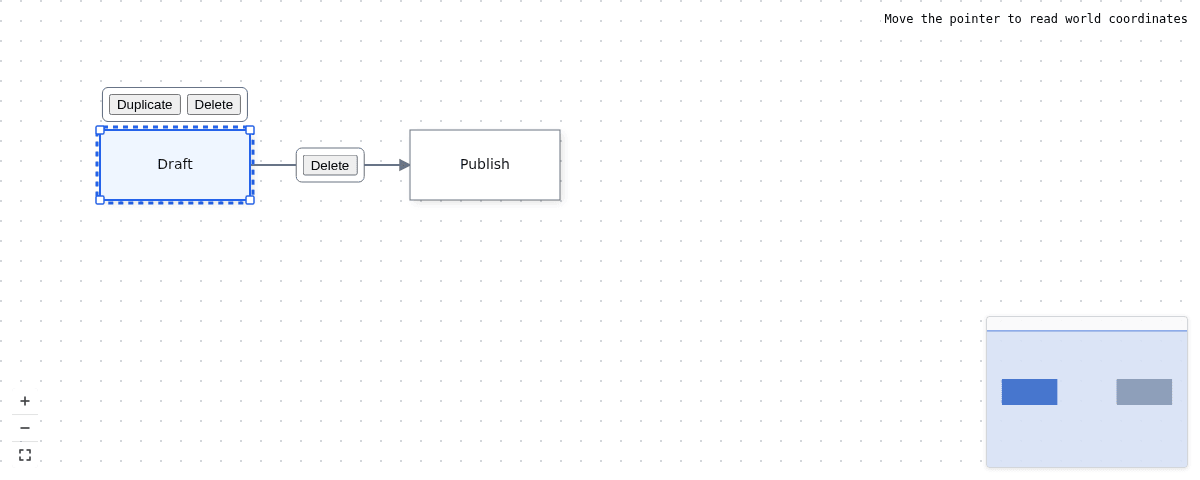
The React sample displays the same two-node editor with a coordinate readout at the top right.
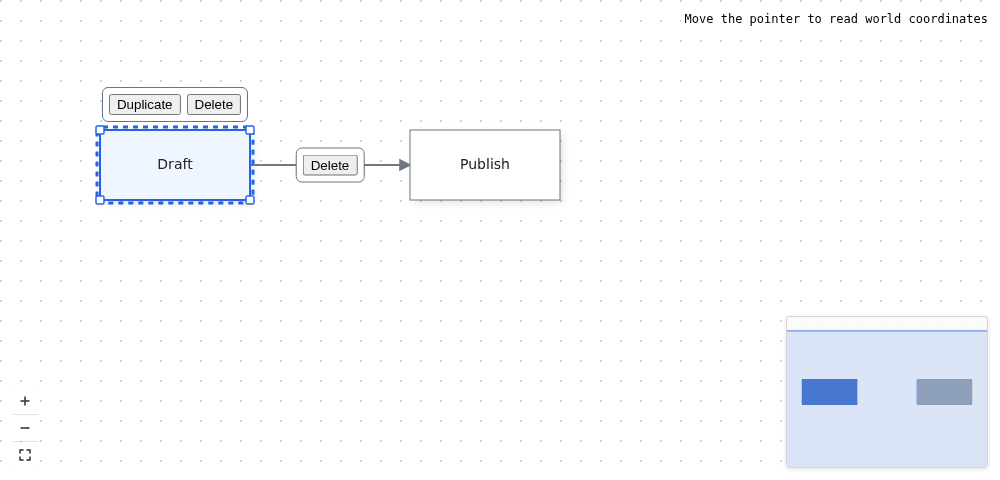
Angular also draws its built-in selection handles and action icons around Draft.
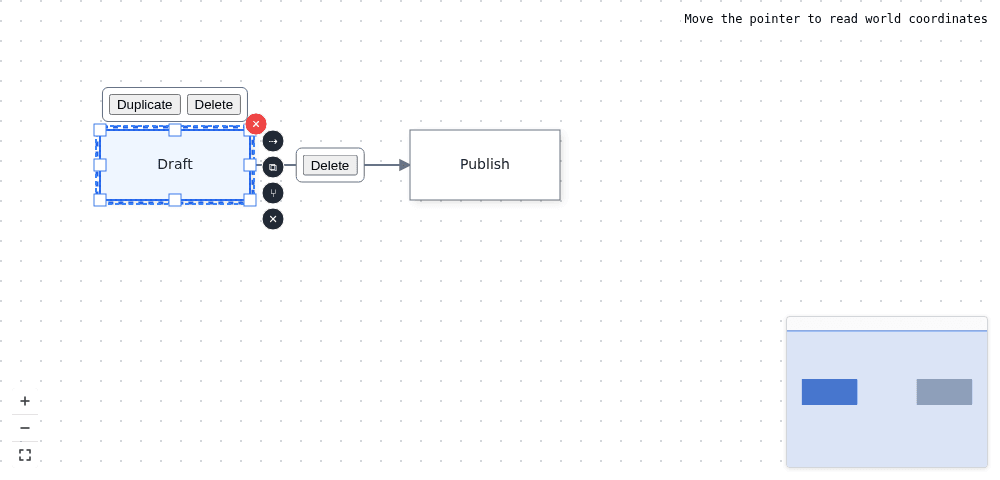
Vue renders the same floating action strips and canvas furniture as React. Both initially display a prompt to move the pointer rather than numeric coordinates.
Qwik's separate component renders its actions above the diagram without importing the shared Angular-based helper.
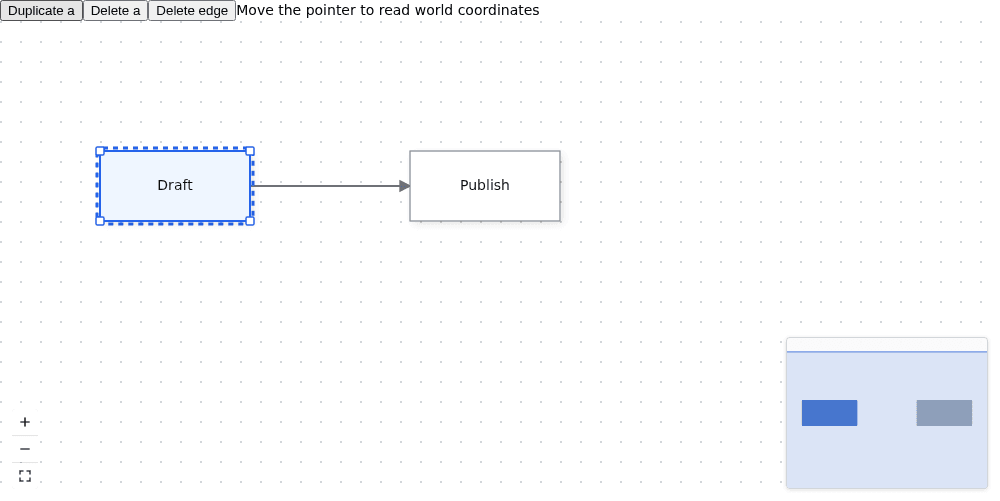
The minimap mirrors the node boxes and shows the camera rectangle. Click or drag inside it to move the camera. Fit view frames the content. Ctrl/⌘+wheel zooms at the pointer; plain wheel scroll pans.
## Options that matter
Use [`CanvasPluginOptions`](https://bench-grafloria-61d.atloria.app/p/bench-grafloria-61d-mQCmWpDrxv/developer/grafloria-renderer-ext-components#canvaspluginoptions) to select furniture. `plugins: true` in a binding enables all three; an options object enables only the entries you supply. Calling `attachCanvasPlugins(instance)` with no options enables none.
| Option | Type | Default | What it does |
| --- | --- | --- | --- |
| `background` | `boolean` or background options | Off when omitted | Adds the grid; the store's `gridEnabled` flag controls visibility when bound. |
| `minimap` | `boolean` or minimap options | Off when omitted | Adds node rectangles and the camera rectangle. |
| `controls` | `boolean` or controls options | Off when omitted | Adds zoom and fit buttons. |
| `bindToStore` | `boolean` | `true` | Keeps furniture visibility and the engine store in sync. |
| `controls.showLock` | `boolean` | `false` | Adds the lock toggle. |
| `controls.zoomStep` | `number` | `1.2` | Multiplies zoom per Zoom in click; Zoom out divides by it. |
| `minZoom` | `number` | `0.1` | Lower camera scale limit. |
| `maxZoom` | `number` | `3` | Upper camera scale limit. |
| `zoomSensitivity` | `number` | `0.1` | Wheel zoom uses a factor of `1 + zoomSensitivity`. |
| `enablePan` | `boolean` | `true` | Enables pan gestures. |
| `enableZoom` | `boolean` | `true` | Enables wheel zoom in JavaScript, React, Vue and Qwik. Angular calls this input `enableMouseWheelZoom`. |
Pan and wheel-zoom switches govern gestures, not imperative camera calls or the plugin buttons. To remove zoom buttons, pass `controls: { showZoom: false }`; to remove all furniture, disable the binding's `plugins` prop.
## Coordinate conversion and palettes
Use the mounted camera, not a new [`ViewportController`](https://bench-grafloria-61d.atloria.app/p/bench-grafloria-61d-mQCmWpDrxv/developer/grafloria-renderer-core#viewportcontroller), for conversions. `clientToWorld(event.clientX, event.clientY, rect)` returns a world point, as the sample's coordinate readout demonstrates. `worldToClient(x, y, rect)` returns client coordinates; subtract `rect.left` and `rect.top` to position an absolute overlay inside the canvas.
The camera's `x` and `y` are world coordinates, but its `width` and `height` are CSS-pixel dimensions. `getViewBox()` returns the visible world rectangle after zoom. Do not divide a camera rectangle by zoom before handing it to a renderer: the renderer applies zoom itself.
For a shape palette, use the shipped searchable stencil palette described in [Build a stencil editor](https://bench-grafloria-61d.atloria.app/p/bench-grafloria-61d-mQCmWpDrxv/developer/build-a-stencil-editor). It provides categorized masters and drag-to-place rather than a second set of node templates you maintain yourself. A palette drop needs the same client-to-world conversion shown here.
## Pitfalls and related tasks
- Keep a node toolbar in screen space if its buttons must retain their size. A [`createViewportPortal`](https://bench-grafloria-61d.atloria.app/p/bench-grafloria-61d-mQCmWpDrxv/developer/grafloria-renderer-ext-functions#createviewportportal) lives in the transformed HTML layer: it pans **and scales** with the scene.
- Keep the node menu's target separate from selection. The example's right-click handler reads the node id under the pointer, so right-clicking Publish does not delete a previously selected Draft.
- Keep teardown in the framework's unmount hook. The bindings own canvas disposal; dispose only the overlays you add yourself.
- For app-owned specs, follow the change-event return path in [React state and subscriptions](https://bench-grafloria-61d.atloria.app/p/bench-grafloria-61d-mQCmWpDrxv/developer/react-state-and-subscriptions), [Vue state and composables](https://bench-grafloria-61d.atloria.app/p/bench-grafloria-61d-mQCmWpDrxv/developer/vue-state-and-composables), or [Angular state and tooling](https://bench-grafloria-61d.atloria.app/p/bench-grafloria-61d-mQCmWpDrxv/developer/angular-state-and-tooling).
- For more toolbar edits on the shared history stack, see [Commands and history](https://bench-grafloria-61d.atloria.app/p/bench-grafloria-61d-mQCmWpDrxv/developer/commands-and-history).
Try the live [minimap and controls](https://grafloria.com/demos/misc/minimap-and-controls.html), [node toolbar](https://grafloria.com/demos/nodes/node-toolbar.html), [edge toolbar](https://grafloria.com/demos/edges/edge-toolbar.html), and [context menu](https://grafloria.com/demos/interaction/context-menu.html) demos. The [minimap demo source](https://github.com/grafloria/grafloria/blob/cccb505e76c7af26c8bafecaba8146db7d8df928/demos/misc/minimap-and-controls.html) shows the same one-call furniture attachment.